
Home > CCNA EIGRP LAB Question

CCNA EIGRP LAB Question

July 1st, 2011 Go to comments

Question

After adding R3 router, no routing updates are being exchanged between R3 and the new location. All other inter connectivity and Internet access for the existing locations of the company are working properly.

The task is to identify the fault(s) and correct the router configuration to provide full connectivity between the routers.

Access to the router CLI can be gained by clicking on the appropriate host. All passwords on all routers are cisco.

IP addresses are listed in the chart below.
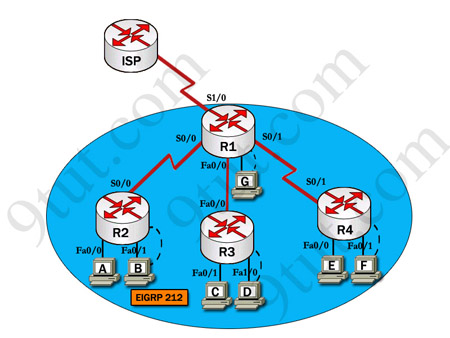
ccna_eigrp_sim

R1

Fa0/0: 192.168.77.33

S1/0: 198.0.18.6

S0/1: 192.168.60.25

R2

Fa0/0: 192.168.60.97

Fa0/1: 192.168.60.113

S0/0: 192.168.36.14

R3

Fa0/0: 192.168.77.34

Fa0/1: 192.168.60.65

Fa1/0: 192.168.60.81

R4

Fa0/0: 192.168.60.129

Fa0/1: 192.168.60.145

S0/1: 192.168.60.26

Answer and explanation

(Note: If you are not sure how EIGRP works, please read my EIGRP tutorial: http://www.9tut.com/eigrp-routing-protocol-tutorial. Note: You can download this sim to practice here: http://www.9tut.com/download/9tut.com_CCNA_EIGRP_sim_question.zip)

We should check the configuration of the new added router first because it does not function properly while others work well. From the command line interface of R3 router, enter the show running-config command
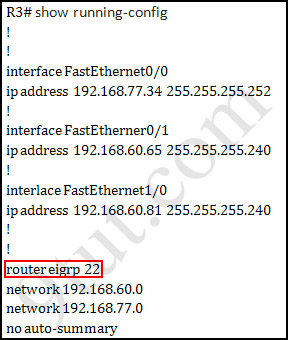
ccna_eigrp_sim_show_run

From the output above, we know that this router was wrongly configured with an autonomous number (AS) of 22. When the AS numbers among routers are mismatched, no adjacency is formed.

(You should check the AS numbers on other routers for sure)

To solve this problem, we simply re-configure router R3 with the following commands:

R3>enable (you have to enter cisco as its password here)

R3#configure terminal

R3(config)#no router eigrp 22

R3(config)#router eigrp 212

R3(config-router)#network 192.168.60.0

R3(config-router)#network 192.168.77.0

R3(config-router)#no auto-summary

R3(config-router)#end

R3#copy running-config startup-config

Check R1 router with the show running-config command:
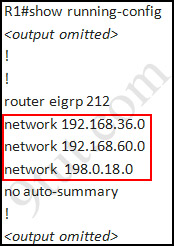
ccna_eigrp_sim_show_run_2

Notice that it is missing a definition to the network R3. Therefore we have to add it so that it can recognize R3 router

R1>enable (you have to enter cisco as its password here)

R1#configure terminal

R1(config)#router eigrp 212

R1(config-router)#network 192.168.77.0

R1(config-router)#end

R1#copy running-config startup-config

Now the whole network will work well. You should check again with ping command from router R3 to other routers!

Modifications:

Maybe in this EIGRP Sim you will see the “passive-interface …” command somewhere in R1 configuration. If the link between R1 to R2 (or R3, r4) routers has the “passive interface” then we have to remove it with the “no passive-interface …” command because it prevents EIGRP update from being sent on that interface. But if the “passive interface” is applied to the link between R1 and ISP router then we just leave it. Don’t use the “no passive-interface s1/0″ on R1 because the link between R1 & ISP doesn’t need EIGRP to run on it. A static route from R1 to ISP & “ip default-network” command in R1 are the correct answers.

(Note: The “ip default-network” command in R1 will advertise the static route of R1 (to go to the Internet) to other routers (R2,R3,R4) so that they can access the Internet too). In the exam you will see these lines in R1 configuration:

!
ip default-network 198.0.18.0
ip route 0.0.0.0 0.0.0.0 198.0.18.5
!

If you want to learn more about “ip default-network” command please read: http://www.cisco.com/en/US/tech/tk365/technologies_tech_note09186a0080094374.shtml

I read recent comments and realized that you will see the “passive-interface” in the link between R1 & ISP so just leave it.

Other lab-sims on this site:

CCNA Access List Sim

CCNA NAT SIM Question 1

CCNA NAT SIM Question 2

CCNA Frame Relay Sim

CCNA Configuration SIM Question (RIPv2 SIM)

CCNA VTP SIM

CCNA Drag and Drop SIM

CCNA Implementation SIM


Comments
Comment pages
1 ... 6 7 8 9 10 ... 12 29
  1. rakhy
    December 21st, 2011

    Hi…Guys…

    I have a doubt in this Eigrp sim.

    Once we find that we don’t have an entry of R3 in R1 configuration, then we configure R1

    using

    network (network address)

    network (network address)

    Do we need to give “no auto-summary” command here after adding all the addresses ?

    Thanks,
    Rakhy.

  2. Mohammed Shokan
    December 21st, 2011

    I took the CCNA exam yesterday (Tuesday December 21, 2011) and this question comes as simulation part or as a lab.

  3. Sanju
    December 21st, 2011

    Plz send the recent simulation questions to sanjeevhaveri@gmail.com. Thanking you….

  4. Koffy
    December 21st, 2011

    @rakhy

    Yes, you need to issue a “no auto-summary” when configuring your network statement, just as is done in the above example. If you don’t, the network will summarize automatically, and you don’t want that. Do you?

  5. Saini525
    December 21st, 2011

    passed yesterday, I got this sim but diagram was different and would not take the no auto-summary command on the config. Off course Network numbers were different. I passed with 854 barely and I studied very hard. The eigrp area was 112 but basically same question. Know the concepts not just the answer.

  6. Abiola
    December 21st, 2011

    I wrote my exam 2day and scored 973. Sims were eigrp, acl2, and vtp. 10ks 2u all, 9tut and examcollection.com. note dt dumps is still valid. Incase u want my assistance contact me at ab_one4u@yahoo.com

  7. I wrote my exam 2day and scored 973. Sims were eigrp, acl2, and vtp. 10ks 2u all, 9tut and examcollection.com. note dt dumps is still valid. Incase u want my assistance contact me at ab_one4u@yahoo.com
    December 21st, 2011

    I wrote my exam 2day and scored 973. Sims were eigrp, acl2, and vtp. 10ks 2u all, 9tut and examcollection.com. note dt dumps is still valid. Incase u want my assistance contact me at ab_one4u@yahoo.com

  8. Anonymous
    December 21st, 2011

    Alhamdolillah i passed today with 881 marks. all simulation comes from 9tut which was vtp, ACL2, EIGRP. Thanks to 9tut.

  9. rakhy
    December 23rd, 2011

    @Koffy thanks for the reply.

    But why didnt 9tut give no auto summary here when adding R3 network address to R1 ?

  10. some
    December 23rd, 2011

    how to check this sim that is it ok or not? after configure the default route towards ISP in R1

    ip default-network 198.0.18.0
    ip route 0.0.0.0 0.0.0.0 198.0.18.5
    then from other router i want to ping to ISP router but not reachable. it should reachable from any router. am i right or wrong? plz ned a ahthenticate feedback..

  11. some
    December 23rd, 2011

    please let me cleare abt it. actually what we have to done in this SIM ? is it only change eigrp AS in router3? then how i could be shure that my task is ok or not after chage it. because of after configure the mentioned change a can reach from all router to 198.0.18.6 but not able to ping ISP side ip 198.0.18.5. so please share with me about your experience in this regard.
    thanks..

  12. Koffy
    December 23rd, 2011

    @rakhy

    Please, look at R3 network statement carefully. The “no auto-summary” command is issued.

  13. Koffy
    December 23rd, 2011

    @some

    Yes, after configuring the “ip default-network” command in R1 will advertise the static route of R1 (to go to the Internet) to other routers R2, R3, R4. Therefore the route is pingable from other networks or routers. The route become reachable……Network or Route of last resort.

  14. some
    December 23rd, 2011

    @Koffy
    thanks a lot for your comment, but i can reach from all lan network to R1 out interface(.6) but not able to ping that other point to point ISP interface (.5). so what could be the wrong in my configuration.

  15. Koffy
    December 23rd, 2011

    @some

    Try if the ping between the ISP router and the R1(serial interface) works. Work at it bit by bit.

  16. some
    December 24th, 2011

    @koffy
    I can ping from R1 S0/0/0 interface to ISP router s0/0/1 interface IP and also able to ping from R2, R3, R4 to R1 s0/0/0 Interface ip but not able to ping ISP router s0/0/1 interface ip from R2,R3 and R4. i didn’t find anything that why it is not ping.

  17. Koffy
    December 24th, 2011

    @some

    Well, now all the conditions being satisfied. The ping between R1 and ISP works, and the ping between R1,R2,R3 and R4 works too.
    R1 is acting as the gateway of last resort, so for R2,R3,R4 to reach ISP router must go through R1.(To the internet)
    The ISP router is a remote router, does not form part of the AS number, and therefore is not pingable from R2,R3,R4.

    For ISP router to be pingable from R2,R3,R4 you must include it in the same AS number as the other routers, and issue the redistribute static command to include this static default route with its eigrp routing updates, then R2,R3,R4 would have the ISP router as their gateway of last resort, then the ISP router is pingable from R2,R3,R4.
    Try it this way, and see if it works.

  18. some
    December 24th, 2011

    @koffy ,

    i’m trying to reditribute static within R1 router EIGRP diclartion. but result is same.

  19. Maqsood
    December 26th, 2011

    Passed exam very comfortably, thanks to 9tut and all guys who take out time to explain the concepts here, for all those who want to know status of dumps and labs all are valid with slight changes like name , AS numbers etc, EIGRP,Access list 2 and vtp are valid.

  20. moncho
    December 28th, 2011

    i had to add ip default network and ip route into ISP router because this sim didnt have it. i did the test last wk and they were already in the ISP router ready to go. i managed to get R3 to ping ISP AFTER i entered those 2 commands (after fixing everything else). if u wonder why R3 wont ping ISP, that is why. also you dont need to worry about other routers, because in the exam they already setup, and the question states you dont need to worry about them. only get R1, R3 and ISP to ping!

  21. madccs
    December 28th, 2011

    I passed the exan today, december 28-2011, the eigrp lab was exactly like this one. I also got the vtp and access-list lab. So, EIGRP, access-list and vtp are valid.

  22. shafiq
    December 28th, 2011

    what is passive interface command? and one more thing in the exam we must have to ping to other router and check the status?

  23. shakeel
    December 29th, 2011

    router eigrp 212
    passive-interface {interface name}

  24. Agni
    December 29th, 2011

    just today passed ccna got 973/1000. sims r ACL2.VTP & Eigrp….same as 9tut.com….thanks a lot….

  25. Radnus
    January 1st, 2012

    Plnning to take CCNA exam can anyone guide me ????

  26. Magnus
    January 4th, 2012

    Hi guys, are the labs in 2012 still ACL2, EIGRP and VTP? Or has Cisco changed them yet?

  27. jumo
    January 5th, 2012

    @9TUT
    How often Cisco change the Sims and questions?

  28. Tulips
    January 5th, 2012

    During the exam, how to check if the configuration is correct?

  29. tohritz
    January 5th, 2012

    Hi guys. On the CCNA exam, is it necessary that all routers can ping the ISP router? I can’t seem to ping the ISP from all the routers except R1. but all the routers(except ISP) can ping each other.

    Routing table of ISP:
    —————————————————————
    Gateway of last resort is not set

    198.0.18.0/30 is subnetted, 1 subnets
    C 198.0.18.4 is directly connected, Serial0/1/0
    —————————————————————

    running-config of R1 :

    ————————————————————–
    !
    router eigrp 212
    network 192.168.36.0
    network 192.168.60.0
    network 198.0.18.0
    network 192.168.77.0
    no auto-summary
    !
    ip classless
    ip default-network 198.0.18.0
    ip route 0.0.0.0 0.0.0.0 198.0.18.5
    ——————————————————

    need your inputs. TIA

  30. tohritz
    January 5th, 2012

    i checked the simulation in packet tracer. if i ping from R2 to ISP, it will reach the ISP but will not go back or send a reply, which is true because ISP doesn’t have a route to R2. Is it really necessary that ping will be successful in this scenario? if it is, can someone help me?

    TIA

  31. Win Maung
    January 5th, 2012

    Thanks a million 9tut.
    Last 29 Dec,2011, I passed NA with 933.
    Sim are ACL,VTP,EIGRP.

    In EIGRP, AS 12 , routers are HOME1,HOME2,Field1,Field2.
    New added router is Home2.
    Home 1 & 2 have fault.After configuration, all connectivity are success but Home 1 & 2 has not updated EIGRP route in routing table even though their adjacencies.That was strange issue.

    Anyhow I appreciate 9tut.

  32. 9tut
    January 6th, 2012

    @jumo: No one knows that!

  33. Decannon04
    January 6th, 2012

    moncho answeres the question above for not being able to ping the isp router from the other routers. Read b4 clogging up the posts.

  34. DPena
    January 6th, 2012

    in the exam that i had today, they said that R3 has no connection for ISP. i made all connection between the others routers,but impossible to ping ISP iven from R1. Pls can someone tell me if this is know and how to fix…..the sims are the same. ACL2, EIGRP, VTP.
    good luck for all ! I had 801 LOL too shame.

  35. Sarmed
    January 6th, 2012

    @DPena

    Routers R2, R3, R4 may not be able to ping ISP Router because ISP Router does not know the way back to R2, R3 or R4. Either a static route in ISP or configuring eigrp in the ISP router should solve the problem. As about R1 not being able to ping ISP Router, I’m not sure. It’s directly connected, so should be able to ping without any problem.

    I’m planning to sit for the exam within a week. Are ACL2, VTP and EIGRP still the most likely simulations?

  36. salman
    January 6th, 2012

    @ SArmed

    What static rouet do we type in? if we type 0.0.0.0 0.0.0.0 198.0.18.6

    will that be right or wrong?

  37. salman
    January 6th, 2012

    @ sarmed

    Can we configure the ISP router with the following commands?

    conf t
    router eigrp 212
    network 198.0.18.5
    exit

    I did this in the lab and they work but is this the right way of doing it???? please reply

  38. Charle
    January 7th, 2012

    In this SIM there you have to add the network 198.0.18.0 in both Routers (R1 and ISP)

    R1(config)#router eigrp 212
    R1(config-router)#network 192.168.77.0
    R1(config-router)#network 198.0.18.0

    ISP(config)#router eigrp 212
    ISP(config-router)#network 198.0.18.0

  39. Sarmed
    January 7th, 2012

    In the exam, I don’t know whether we are allowed to manipulate ISP router. But logically, it’s very unlikely. And I’m not sure either whether we are required to successfully ping the ISP router for exam purposes. I believe if routing information is being propagated between R1, R2, R3 and R4; the simulation purpose is solved and we can move on to the next question.

    In real life, the ISP router and R1 would run either a static route or BGP (not in the CCNA curriculum and I don’t know how to configure it..yet).

    For practice purposes, the propositions of salman & Charle should work.

  40. Sarmed
    January 7th, 2012

    edit: please don’t forget to use “no auto-summary” while configuring EIGRP.

  41. Dpena
    January 7th, 2012

    @Sarmed . For your question, yes the sims are the same.
    I lost time trying make ping work between R1 and ISP. we dont have access in ISP in the real exam.
    And dont make my mistake whit Sim ACL2 , i put the acces in the wrong interface…once i realized i started all configurations again but i had no more time (2 min ) result : i forgot one statment!!!!!
    Good Luck for all!

  42. tohritz
    January 7th, 2012

    @Dpena
    So in the exam, you are not required to ping the routers to the ISP? if you can ping all the routers except the ISP, then you have completed the lab. is that so?

    Also during the exam, when do you execute “copy run start”? is it after you get out of the console of each router? or after you are sure that your configs are correct? this may sound stupid, but just a caution. :)

  43. Sarmed
    January 9th, 2012

    @Dpena

    Thanks for the information ^_^

  44. Jimi
    January 11th, 2012

    Why does 9tut say to ping all the other routers and check AS number from all the other routers when the question already states that ” All other inter connectivity and Internet access for the existing locations of the company are working properly”. The only concern should be between R1 and R3.

  45. 9tut
    January 11th, 2012

    @Jimi: I just want to you to double-check the AS number with other routers :)

  46. Umair
    January 12th, 2012

    do we need to change anything or config ISP router?

  47. John
    January 13th, 2012

    No dont need to configure the network to see the ISP router. Do it only as it says on the exam. I did it as a practice and setup a

    ip-default route to the ISP and pinged it from all the other routers to the ISP and it works.

    In the exam the 198.0.18.0 is already advertised on Router 1

  48. John
    January 13th, 2012

    to check the AS # just do Show run on all the Routers and it should be in there.

  49. Michael
    January 13th, 2012

    Hi all! I will take the exam on Monday, I am not sure what is dump? but will be appreciated if someone can send that to me at vutrang02@MSN.com. Thank you in advance.

  50. MAYANK SONI
    January 13th, 2012

    2SAY I HAVE PASSED MY CCNA EXAM AND SCORED WITH 995 MAKS. THANX 9TUT.COM

  51. Flesz
    January 13th, 2012

    I passed today with the score 947, all sim labs and most of the questions from here were the same or similar. Thanks a lot 9tut

  52. tobias
    January 15th, 2012

    Can we in EIGRP lab use network command with wild card mask to advertise specific subnet (in theory this works but I am not sure how simulator will grade this on exam).
    Example is network 192.168.60.64/28 connected to fa0/1 on R3.
    “network 192.168.60.64 0.0.0.15″.

  53. Umair
    January 16th, 2012

    hey all..we dun need to config ISP router as its not asked in question..why is every1 discussing abt it ?

  54. zero
    January 16th, 2012

    what your simulation for 640-802 ?

  55. CCNA Aspirant
    January 17th, 2012

    Hi All, Is this dump “Cisco.Acme.640-802.v2011-07-09.by.Collisio.486q.vce” still valid? please Refer me latest dump link. thanks

  56. CCNA Aspirant
    January 17th, 2012

    Hi RRR and all,
    i am not able to find the dump dima dima 486Q from http://www.examcollection. can you please refer dump link?. Thanks

  57. M2theC
    January 17th, 2012

    Passed today. Big thanks 9tut. Most Q’s from Acme dump. Sims EIGRP, VTP, ACL2. EIGRP was a different layout, but same concept- AS number and network #s.

  58. KSU
    January 19th, 2012

    Guys,

    How is it that network 192.168.36.0 is not added to the R3? Is this cause R3 already know about 192.168.60.0 and no host are on x.x.36.0 network?

    Thx

  59. paktin
    January 20th, 2012

    hey guys i have performed this sim but i could not find the solution for it… i want to write the exam on 23rd jan 2012….the question is that do routers send eigrp updates from its fastethernet interface…???? the link between R1 and R3 in this sim…………
    and please tell me which sims will be there in exam..????? nat will be there..???
    thanks

  60. paktin
    January 20th, 2012

    one thing more that if we want to connect to ISP then we need NAT configuration , shall we do that/////////////????????????????????

  61. Ahmed
    January 20th, 2012

    I’ll take the exam tomorrow

  62. Ezra
    January 22nd, 2012

    Question.

    192.168.60.0/30 is subnetted, 2 subnets
    C 192.168.60.64 is directly connected, FastEthernet0/1
    C 192.168.60.80 is directly connected, FastEthernet1/0
    192.168.77.0/30 is subnetted, 1 subnets
    C 192.168.77.32 is directly connected, FastEthernet0/0

    Looking at this table when adding networks can i just use the:
    network 192.168.60.64
    network 192.168.60.80
    network 192.168.77.32

    or i need to add the classful networks? will it create error in the real exam?

  63. adi
    January 22nd, 2012

    @Ezra, you can look at other routers in the topology, if on R2 or R4 in network statement are classless networks with wildcard masks, you do the same on R1 and R3, but if they are classfull everywhere, then u will do the same

  64. Ezra
    January 22nd, 2012

    @Adi. Thanks :D

  65. Ahmed
    January 22nd, 2012

    ip default-network 198.0.18.0
    ip route 0.0.0.0 0.0.0.0 198.0.18.5

    didn’t work wiith me today in the exam :((((((

  66. Umair
    January 22nd, 2012

    hey ahmed? why do u need to put the default network in eigrp ?
    the question asks jus to configure eigrp properly

  67. Umair
    January 22nd, 2012

    In eigrp is it necessary to ping each and every remote and router after configuring eigrp properly? I heard that their are points for doing this

  68. Danny
    January 23rd, 2012

    hi everyone !
    I took ccna exam yesterday but failed with 793 marks, most of the questions were from acme(collisio) dumps and labs were EIGRP,ACL2,VTP same as 9tut, but i still failed because i took it easy, badluck :(
    neway now i am planning to retake my exam in next month and i wanna ask that do cisco change their exam for retakers ?? can i relly on dumps and 9tut (for labs) again ??
    or exam procedure, questions and labs will be new ?? please help

  69. adi
    January 23rd, 2012

    @ ahmed, it’s necessary to enter ip default-network 198.0.18.0 ? what is the latest updates on EIGRP SIM ?

  70. adi
    January 23rd, 2012

    @ ahmed, after you put 0.0.0.0 0.0.0.0 with next hop/exit interace, on R1 do you redistribute default route to other routers with redistribute static ?

  71. SANKARTHIK
    January 24th, 2012

    Is this sim has been changed?(EIGRP,ACL2,VTP)

  72. BRONZ
    January 24th, 2012

    Assalam-o-Alaikum

    Passed CCNA yesterday 23rd Jan with 986.

    Acme Collisio dumps are good and you can use DHARANI too but for new questions but trust Acme Collisio for the old questions because some questions in DHARANI (the old ones) are not right.

    Got 48 questions in total 45 MCQs and 3 SIMS (VTP, ACL-2, EIGRP)

    in VTP there were some changes but the SIMS were same so if you have learned the sims not crammed no need to worry :)

    1. For Q4 the answer was Sw-AC3 because it was the root bridge
    2. For Q6 the answer was Sw-Ac3(locally) because it was updated locally
    3. For Q7 the answer was C because the revision number on Sw-Ac3 was higher than on SwX

    For ACL-2 the requirements were:
    1. Permit Host A access to Financial web server(FWS): access-list 100 permit tcp host 192.168.22.1 host 172.22.200.17 eq 80
    2. Deny Host A and All other hosts access to FWS services: access-list 100 deny ip any host 172.22.200.17
    3. Permit all other hosts access to Public Web Server(PWS): access-list 100 permit ip any any

    The ip addresses were almost like the one’s is wrote but I’m not exactly but not the case because they will be changed so just keep in mind the scenario.

    For EIGRP.
    1. The Main Router was Perimeter.
    2. The other Router was Interior.

    Just configure the routers like its done here and you will be fine. Just remember to test the connectivity of all the router among themselves no need to worry about ISP router no configuration for that.

    Thanks 9tut and ExamCollection and Pass4sure.

    Best of luck to you all :)

  73. syedmohdfaiz
    January 24th, 2012

    hi,i,am a completed ccna and i,got a voucher so if reply a some lattest question to reply her my email.idy i, am very happy and got voucher for better performance

    my email:syedmohdfaizs0@lgmail.com
    thankyou

  74. zero
    January 24th, 2012

    In the Eigrp simulation test the default is missing ?

  75. mark
    January 25th, 2012

    hi i just passed the exam, for this sim the question was to ensure connectivity to the isp.

    i was able to ping the isp after my configuration.

    the ip addresses are different in the exam, so make sure u guys understand what ip addresses you route with eigrp, i was looking for the .77 and .60 networks there..

    the ip address of the isp though was 192.0.18.6 also i think.

  76. Yat
    January 25th, 2012

    What is the appropriate host you use when doing the configurations during the CCNA exam, is it the terminal of a pc or you can get straight into the router.

  77. SANKARTHIK
    January 25th, 2012

    Dear Friends,

    ACL2,Eigrp,VTP is the sime has been changed in CCNA exam?can anyone let me know??

  78. Iyot
    January 27th, 2012

    why is that the network mask is not included in the configuration? any one can help and reply me..thanks a lot

  79. Sundar
    January 28th, 2012

    I passed CCNA exam today.Got sim EIGRP,ACL2,VTP as the same in 9tut,but the ip address were diferrent.

    Planning CCNP…all the best for all CCNA candidates.

  80. boby
    January 28th, 2012

    cisco change CCNA in february ???

  81. boby
    January 29th, 2012

    May be??

  82. Andrew
    January 29th, 2012

    Maybe a dumb question. How do I switch routers in the test? What is the command for going from R3 to R1?

  83. need help
    January 30th, 2012

    Hello 9tuters! I’m just a little bit confused regarding this EIGRP simulation. Do i need to configure the R1 a default network and ip route? Is it a requirement to ping the isp from all the routers. (routers to ISP vise versa)

    Because I doubt with the comment above that there must be a full connectivity between them including the isp.

    or i’ll just follow the configuration of the simulation above? then i’ll be safe.

    Sorry for my bad english.
    Thank you.

  84. need help
    January 30th, 2012

    @mark

    could you pls.. post the configuration of the eigrp simulation that you had taken? Is there any additional configuration regarding this EIGRP simulation? Is the scenario about this has changed or not.

    You will be praise by the Lord ..
    thank you….

  85. mark
    January 30th, 2012

    @need help

    it’s basically the same as this example. in my test though it said that the new router should be able to ping the isp. so i did that after the configs.

    before i pinged the isp though i pinged one router (the one to the right). that should work first.

    @andrew you cannot switch routers in the test.

  86. @need help
    January 30th, 2012

    @mark
    Thanks for that. One last question, do I need to configure a default route if in the real test it will not be shown?

  87. Andrew
    January 31st, 2012

    Mark, then how do I go from Router 3 to Router 1 in my commands?

  88. Ranjitha
    January 31st, 2012

    “passive-interface …” command somewhere in R1 configuration. in the above sim 9tut explained abt that…then using which command we will check that 1 is present or not….iam going to write ma xam tomorrow so pls give me a fast rply…..thanks in advance

  89. zaza
    January 31st, 2012

    Do you have a other simulation in you test ?

  90. ADF
    January 31st, 2012

    I just got my CCNA certification and this question was in the exam. The only problem is that there where more than two faults. I did well the two faults that are explained here but I couldnt find the third one in time.

  91. Anonymous
    February 1st, 2012

    hello at all

    for those who took the exam. Did you experience the “error config lock” something like that in eigrp?

  92. Kamote
    February 1st, 2012

    Hi Anonymous,
    Seems like we encountered the same problem. i took the CCNA exam last janurary 31st and experice a problem with my eigrp.. after i delete the wrong AS, my ENG router does not function at all.. it just hung up, the cursor is just blinking.. good thing i passed the exam..
    dumps is still valid with 2 new questions… thanks to 9tut.com.. more power!!!!

  93. TRIGUN
    February 2nd, 2012

    Quick question why is that network mask is not included in the configuration?

  94. TRIGUN
    February 2nd, 2012

    considering that we hit the no auto-summary??? ?_? why is that the network wild card bits not included in the command?

  95. Anonymous
    February 2nd, 2012

    @Kamote

    I also took my exam last January 31, 2012, we encountered the same problem. Good thing, I also passed the exam. And with that “error” I expect that I would fail the exam because my eigrp simulation goes something like that. At the end of the exam, BOOM!! I passed..
    I think that is a bug in the eigrp simulation or cisco intentionally put that in exam because those routers wherein that error appeared are not the priority to be answered on the eigrp simulation question.. You must focus on the task of what cisco is requiring on that eigrp sim.
    You can only do a show run on those two routers then you can see duplicate networks and two ip addresses on a single interface but you cannot configure them, that’s why.

  96. Kamote
    February 2nd, 2012

    Hi Anonymous,

    Maybe your right, but the router that i have reconfigured was the one with the wrong AS on it, and after deleting that AS the error appeared… Good thing we both passed the exam even we have scored zero in the EIGRP Sim… hehehe Cheeers!!!

  97. john
    February 2nd, 2012

    how many time in which complete the the labs

  98. john
    February 2nd, 2012

    the eigrp simulation bug ?????

  99. Anonymous
    February 3rd, 2012

    @Kamote
    no kamote we haved scored 100% on the eigrp sim.. ehehehe!! I got 1000/1000. Maybe I think cisco intentionally put that bec. they were not the priority to be answered.

    For those who will take the exam soon…. Be careful on the eigrp simulation.

  100. Anonymous
    February 3rd, 2012

    @john
    maybe….

Comment pages
1 ... 6 7 8 9 10 ... 12 29
  1. No trackbacks yet.
Add a Comment
