
EIGRP GNS3 Lab
In this tutorial we will learn how to use EIGRP to run a small network with 5 routers. Below is the topology of this lab
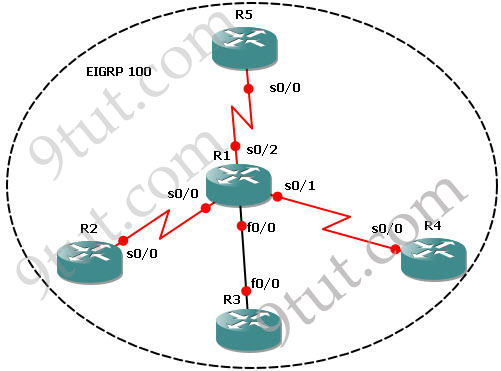
This lab consists of 5 routers and we need to configure EIGRP among them. It is done when we can successfully ping among R2, R3, R4 & R5 and the routing tables of these routers show that they are running EIGRP (with letter “D”).
IOS used in this tutorial: c2600-bin-mz.123-6f.bin (with a minimum of 64 MB RAM) but you can use other IOS.
Note: If you are not sure about EIGRP, please read my EIGRP Routing Protocol tutorial first
IP addresses of routers:
+ R1:
s0/0 – 192.168.30.12/28
s0/1 – 192.168.30.18/28
s0/2 – 192.168.30.35/28
f0/0 – 192.168.60.10/28
+ R2:
s0/0 – 192.168.30.13/28
+ R3:
f0/0 – 192.168.60.13/28
+ R4:
s0/0 – 192.168.30.20/28
+ R5:
s0/0 – 192.168.30.40/28
If you are not sure about EIGRP, please read my article about this routing protocol at http://www.9tut.com/eigrp-routing-protocol
Some important notes about EIGRP:
+ All routers must use the same Autonomous System (AS) number to recognize each other. In this case the chosen AS is 100.
+ The major network in this lab is 192.168.30.0 & 192.168.60.0 so there will be discontiguous networks -> need to use the “no auto-summary” command.
Now let’s begin the lab!
Step 1 – Configuring IP addresses on the routers
*On R1:
R1#config t
R1(config)#int s0/0
R1(config-if)#ip address 192.168.30.12 255.255.255.240
R1(config-if)#no shut
R1(config-if)#int s0/1
R1(config-if)#ip address 192.168.30.18 255.255.255.240
R1(config-if)#no shut
R1(config-if)#int s0/2
R1(config-if)#ip address 192.168.30.35 255.255.255.240
R1(config-if)#no shut
R1(config-if)#int f0/0
R1(config-if)#ip address 192.168.60.10 255.255.255.240
R1(config-if)#no shut
*On R2:
R2#config t
R2(config)#int s0/0
R2(config-if)#ip address 192.168.30.13 255.255.255.240
R2(config-if)#no shut
*On R3:
R3#config t
R3(config)#int f0/0
R3(config-if)#ip address 192.168.60.13 255.255.255.240
R3(config-if)#no shut
*On R4:
R4#config t
R4(config)#int s0/0
R4(config-if)#ip address 192.168.30.20 255.255.255.240
R4(config-if)#no shut
*On R5:
R5#config t
R5(config)#int s0/0
R5(config-if)#ip address 192.168.30.40 255.255.255.240
R5(config-if)#no shut
Now all the interfaces are up. We should check the interfaces on R1 to confirm this with the “show ip int brief” command
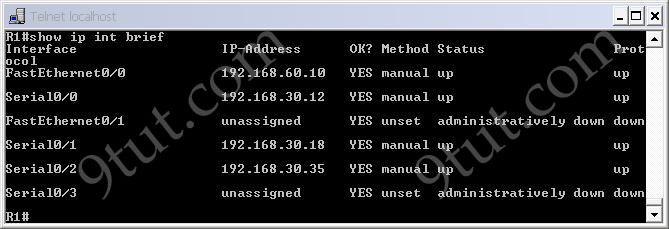
Notice that all both the “Status” and “Protocol” of the connected interfaces were up.
We can see all the neighbors of R1 with the “show cdp neighbors” command on R1:
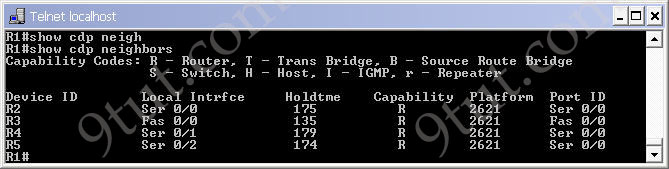
At this time we can ping between two directly connected interfaces. For example a ping from s0/0 of R1 to s0/0 of R2 (192.168.30.13) will be successful.

but a ping between two far-away interfaces is not successful. For example a ping from R2 to s0/0 of R4 (192.168.30.20) will be unsuccessful.

If we use the “show ip route” on these routers we will only see directly connected link.
Step 2 – Enable EIGRP on all the routers
*On R1
R1(config)#router eigrp 100
R1(config-router)#network 192.168.30.0
R1(config-router)#network 192.168.60.0
R1(config-router)#no auto-summary
*On R2
R2(config)#router eigrp 100
R2(config-router)#network 192.168.30.0
R2(config-router)#no auto-summary
*On R3
R3(config)#router eigrp 100
R3(config-router)#network 192.168.60.0
R3(config-router)#no auto-summary
*On R4
R4(config)#router eigrp 100
R4(config-router)#network 192.168.30.0
R4(config-router)#no auto-summary
*On R5
R5(config)#router eigrp 100
R5(config-router)#network 192.168.30.0
R5(config-router)#no auto-summary
After typing above commands we will see the neighbors adjacency on these routers are up. For example on R1 we will see
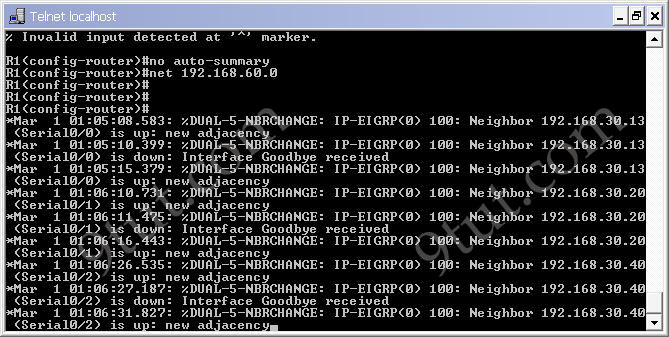
Now the EIGRP process is up and we can ping from anywhere. For example a ping from R2 to s0/0 of R4 (192.168.30.20) will be successful now.

By checking the routing table of R2, R3, R4 & R5 we can confirm EIGRP has been implemented successfully. For example, using the “show ip route” command on R5 we see
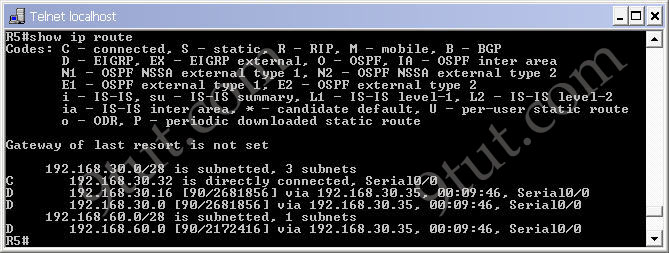
Notice that the routes to 192.168.30.16 & 192.168.60.0 are marked with a letter “D”, meaning it is learned via EIGRP. Maybe you are wondering “why is the letter “D” used for EIGRP, not “E”? Well, the answer is the letter “E” has been “stolen” for EGP – an external routing protocol – but it is not popular nowadays :)
We can check the neighbor relationships on these routers with the “show ip eigrp neighbors” command. Below is an example of R1:
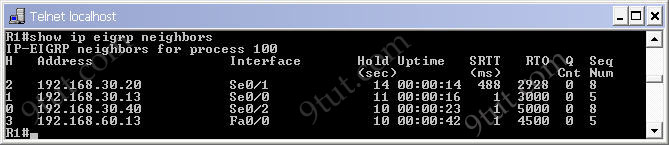
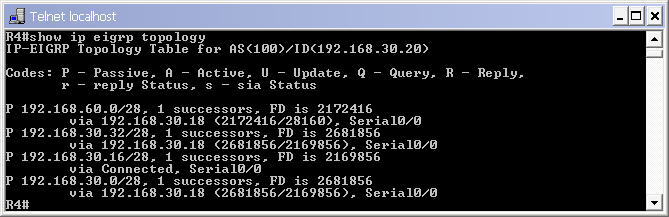
To see the topologies of these routers, use the “show ip eigrp topology” command. Below is the output of R4
Download the configured network
TROUBLESHOOTING part
In this part, we created a faulty network and your task is to find out and fix the errors to make the network run perfectly. You can download the files here: Download faulty network

You Guys are doing SUPERB…
Appreciable work !!
Keep it up..
:) :)
These are breaf perfact details for ccna
you guys are doing a real good thing..
i am going to take exam next month , hopefully i pass the exam with great mark. thank you for these valuable tutorials. i really apreciate it.
i m experience a 203 error on gns …while loading a gns3 downloaded lab from 9tut ..is anyone knows about this 203 ?
How to open the files which is in “Download faulty network” link.
@rohini: Please unzip it and use GNS3 t open it.
@9tut,tanks for this tutorials ,ur guys rocks
It just took me only half an hour to understand the eigrp concepts. I really appreciated your detailed explanation.
guys, this is not directly related to the topic..but had a little problem lately on how to save my gns3 labs then load it..but i had it sorted out…just curious on the working folder that is created after you save a project…what is that folder for? when opening up a project, we just need to import the configs right? and has nothing to do with the working folder? what are the uses of the files in the working folder?
Guys,
I am also getting error while opening this gns file, the error says “Dynamips error – Could not connect to the server”.
Please help!!
Thanks
@Nash D: You have to change the “working directory” & “image” path in .net file to make it work well.
It worked for me, thanks 9tut!!
I was not uploading the image. I thought it came with this EIGRP lab but that wasn’t the case (I couldn’t find it, please correct me if I am wrong). I downloaded ‘c2600-bin-mz.123-6f.bin’ image from the internet and pointed the image path to it and changed ‘working directory’ and it worked.
P.S. It is a big memory hog. I still like Packet Tracer better than this in terms of configuration and memory issues.
Does any one has a say on it? :)
grt work, it will help me lot.
After You open (.net) file You should Go to File –> Import/Export chose configuration file …. it will work 100% without error .
That the letter “E” is taken by EGP may explain why EIGRP does not use the letter “E,” but it does not answer the question: Why does EIGRP use the letter “D?”
The letter “D” stands for DUAL, the Diffusing Update Algorithm. DUAL is the programming that dictates how EIGRP chooses least-cost loop-free routes, and makes for a much more interesting answer, IMO. :)
http://en.wikipedia.org/wiki/Diffusing_update_algorithm
I did not see any clock rate command in the configuration, is that right?
Appreciate 9tut very much for all your postings. Thank you very much.
hi everyone and 9tut,
where i can get the ios image..i can’t run my gns3 because it’s asking me to register atleast one ios image…
thanks a lot for the help,i’ll appreciate it…
Plz tell me how can connect 3 routers together? If any one is here plz tell me soon.
Hello 9tut friends…..It is so good to understand….Superb…
i can’t open the troubleshooting lab in gns3. i was able to get the initial eigrp 100 topology going in packet sniffer though. thank you so much 9tut! this is probably the best cisco learning experience i’ve ever had. i have learned so much through this site.
soon as i’m working again i will be making a donation. i really appreciate the help. you guys are lifesavers.
I have downloaded the faulty file, changed the working directory,image path & the router model to 3640 as i have an ios image of that model,, i have a gns error attempt to connect to non existent interface in slot 0 on device R1??? can any one help?
9TUT
please can someone tell me what have done wrong..i tried connecting the 5 routers together in packet tracer, i successfully configure all the ip addresses on each router,serial connection show green after issuing NO SHUT command, but wen i tried ”show ip int brief on each router the serial connection PROTOCOL status is DOWN..
can someone help pls
moadelekan@gmail.com
@confused candidates
Line is UP – you have used the correct type of cable, the devices are powered on
Protocol is DOWN – L2 problem.
my guess: if using serial links – you forgot to set the clock rate on the DCE router, right?
HI all
Can any one please send dumps forccna iam going to take the exam on coming tuesday. Please help me my email…jainulhussain@live.com
best work man all your sim’s are flawless i am making all the topologies by hand it”s awesome
you rock ma
THANKS FOR MAKING IT SIMPLE TO UNDERSTAND..:)
Its very very helpful and explained in a easy way . . . Thanks 9tut.
Any 1 have the latest dumps for CCNA.. i really need thm.. if have plz send me on ‘engr.hayat@gmail.com’….i will be thankful to u for this.
Thanks
@Hussain
if u got any dumps for CCNA plz email me… engr.hayat@gmail.com
i will be thnkful to u.
Thnks
Guys !!1 Confusion…!!!
Does EIGRP uses Wild Card mask to define VLSM and Discontgious Network ? if yes in these labs they are missing …!!!
May I copy some of your material to my website in other language ?
Thanks
I simulator is awesome. Also please do post redistribution and summarization
Simply fantastic!
how can you ping a DCE device?
When i do “show ip route” command on R1 I only see my directly connected routes. However, I can ping between devices.
Great work. Many thanks
it is good for practice
Hi 9tut, I did the examination today and unfortunately I failed 720…….I was given a console into the main router and had to configure all the rest of router interfaces but no matter what I did I could not open the rest of the routers……..Double-clicked, you name it and I just couldn’t get into any of the rest……If one is only consoled into 1 of the routers, tell me how do I access the rest…….? I might have missed that instruction and maybe I was doing some thing basically WRONG? I understand theories and every thing else but……This just didn’t work for me today?
Maybe you’re to use telnet from the main router to connect to the other routers if there was no direct console connection! you must have missed that. I’m also preparing for mine. Good luck next time.
Guys Its Time to update the Simulations don’t you think SO ?
Hello Guys I hope you will be fine there. I have CCNA (640-802) Vouchers on
special discount of 58% for World wide, with six months expiry date till you
purchase. Each voucher cost 60USD.
Details Required For CCNA Voucher For Discount Processing:
1-Full Name. 1st Name & Last Name (as you want to appear on certificate & documents)
2-Country.
3-City.
4-State.
5-Pin Code (or Area Code)
6-Residential Address (or where you can collect your Certificate or further correspondence
can be received)
Add me on Skype through this information which is written below:
Skype Name: rockon660
you can also email me at this email address which is written below:
madeelqaiser@gmail.com
If you have any Questions feel free to contact me.
Thanks,
Best regards,
Adeel
Thank you a lot for giving everyone a very brilliant opportunity to read in detail from this web site. It is usually so amazing and also packed with a great time for me and my office co-workers to visit your website not less than thrice in a week to learn the latest issues you will have. Of course, we are actually impressed considering the striking tactics you give. Some two facts in this posting are basically the most efficient we have all ever had. coach outlet http://www.yesidobodas.com/contenidos/movil/coach-store.html
I like what you guys are up too. Such smart work and reporting! Carry on the superb works guys I have incorporated you guys to my blogroll. I think it’ll improve the value of my site :) coach outlet http://www.brainysoftware.com/yui/docs/coach-store.html
You are a very capable individual! coach outlet http://www.pipalanswers.com/pipaldb/experts/coach-for-sale.html
What i do not understood is in reality how you’re not really much more smartly-favored than you might be now. You’re so intelligent. You recognize thus considerably with regards to this topic, produced me individually consider it from numerous numerous angles. Its like women and men don’t seem to be involved except it is one thing to do with Woman gaga! Your own stuffs great. All the time handle it up! coach outlet http://www.brainysoftware.com/yui/docs/coach-for-sale.html
Attractive section of content. I just stumbled upon your blog and in accession capital to assert that I acquire actually enjoyed account your blog posts. Anyway I’ll be subscribing to your feeds and even I achievement you access consistently rapidly. coach outlet http://www.yesidobodas.com/contenidos/movil/coach-for-sale.html
I carry on listening to the rumor speak about getting free online grant applications so I have been looking around for the best site to get one. Could you tell me please, where could i find some? coach outlet http://www.brainysoftware.com/yui/docs/coach-factory.html
You Rock !!!