In this article, we will learn how to subnet and make subnetting an easy task.
The table below summarizes the possible network numbers, the total number of each type, and the number of hosts in each Class A, B, and C network.
| |
Default subnet mask |
Range |
| Class A |
255.0.0.0 (/8) |
1.0.0.0 – 126.255.255.255 |
| Class B |
255.255.0.0 (/16) |
128.0.0.0 – 191.255.255.255 |
| Class C |
255.255.255.0 (/24) |
192.0.0.0 – 223.255.255.255 |
Table 1 – Default subnet mask & range of each class
Class A addresses begin with a 0 bit. Therefore, all addresses from 1.0.0.0 to 126.255.255.255 belong to class A (1=0000 0001; 126 = 0111 1110).
The 0.0.0.0 address is reserved for default routing and the 127.0.0.0 address is reserved for loopback testing so they don’t belong to any class.
Class B addresses begin with a 1 bit and a 0 bit. Therefore, all addresses from 128.0.0.0 to 191.255.255.255 belong to class B (128=1000 0000; 191 = 1011 1111).
Class C addresses begin with two 1 bits and a 0 bit. Class C addresses range from 192.0.0.0 to 223.255.255.255 (192 = 1100 0000; 223 = 1101 1111).
Class D & E are used for Multicast and Research purposes and we are not allowed to subnet them so they are not mentioned here.
Note: The number behind the slash notation (/) specifies how many bits are turned on (bit 1). For example:
+ “/8” equals “1111 1111.0000 0000.0000 0000.0000 0000” -> 8 bits are turned on (bit 1)
+ “/12” equals “1111 1111.1111 0000.0000 0000.0000 0000” -> 12 bits are turned on (bit 1)
+ “/28” equals “1111 1111.1111 1111.1111 1111.1111 0000” -> 28 bits are turned on (bit 1)
+ “/32” equals “1111 1111.1111 1111.1111 1111.1111 1111” -> 32 bits are turned on (bit 1) and this is also the maximum value because all bits are turned on.
The slash notation (following with a number) is equivalent to a subnet mask. If you know the slash notation you can figure out the subnet mask and vice versa. For example, “/8” is equivalent to “255.0.0.0”; “/12” is equivalent to “255.240.0.0”; “/28” is equivalent to “255.255.255.240”; “/32” is equivalent to “255.255.255.255”.
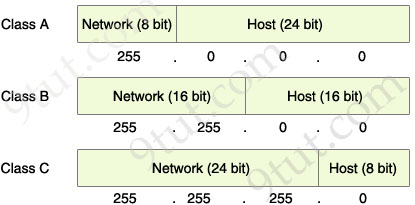
The Network & Host parts of each class by default
From the “default subnet mask” shown above, we can identify the network and host part of each class. Notice that in the subnet mask, bit 1 represents for Network part while bit 0 presents for Host part (255 equals to 1111 1111 and 0 equals to 0000 0000 in binary form).
READ MORE…

 Your company is growing and you need to transfer more than 100 Mbps between these switches. If you only connect other links between the two switches it will not work because Spanning-tree protocol (STP) will block redundant links to prevent a loop:
  To extend the capacity of the link you have two ways: