
CCNA EIGRP LAB Question
Question
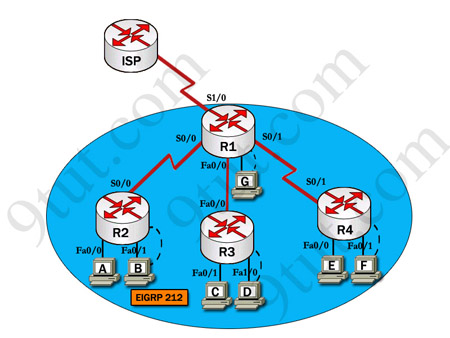
After adding R3 router, no routing updates are being exchanged between R3 and the new location. All other inter connectivity and Internet access for the existing locations of the company are working properly.
The task is to identify the fault(s) and correct the router configuration to provide full connectivity between the routers.
Access to the router CLI can be gained by clicking on the appropriate host. All passwords on all routers are cisco.
IP addresses are listed in the chart below.
|
R1 Fa0/0: 192.168.77.33 S1/0: 198.0.18.6 S0/1: 192.168.60.25 |
R2 Fa0/0: 192.168.60.97 Fa0/1: 192.168.60.113 S0/0: 192.168.36.14 |
|
R3 Fa0/0: 192.168.77.34 Fa0/1: 192.168.60.65 Fa1/0: 192.168.60.81 |
R4 Fa0/0: 192.168.60.129 Fa0/1: 192.168.60.145 S0/1: 192.168.60.26 |
Answer and explanation
(Note: If you are not sure how EIGRP works, please read my EIGRP tutorial: http://www.9tut.com/eigrp-routing-protocol-tutorial. Note: You can download this sim to practice here: http://www.9tut.com/download/9tut.com_CCNA_EIGRP_sim_question.zip)
We should check the configuration of the new added router first because it does not function properly while others work well. From the command line interface of R3 router, enter the show running-config command
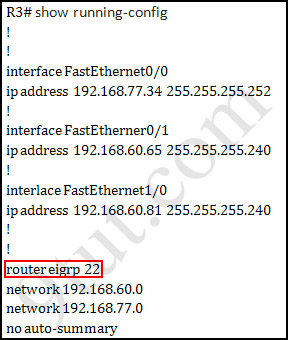
From the output above, we know that this router was wrongly configured with an autonomous number (AS) of 22. When the AS numbers among routers are mismatched, no adjacency is formed.
(You should check the AS numbers on other routers for sure)
To solve this problem, we simply re-configure router R3 with the following commands:
R3>enable (you have to enter cisco as its password here)
R3#configure terminal
R3(config)#no router eigrp 22
R3(config)#router eigrp 212
R3(config-router)#network 192.168.60.0
R3(config-router)#network 192.168.77.0
R3(config-router)#no auto-summary
R3(config-router)#end
R3#copy running-config startup-config
Check R1 router with the show running-config command:
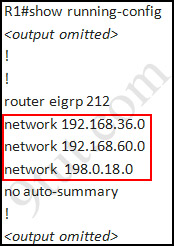
Notice that it is missing a definition to the network R3. Therefore we have to add it so that it can recognize R3 router
R1>enable (you have to enter cisco as its password here)
R1#configure terminal
R1(config)#router eigrp 212
R1(config-router)#network 192.168.77.0
R1(config-router)#end
R1#copy running-config startup-config
Now the whole network will work well. You should check again with ping command from router R3 to other routers!
Modifications:
Maybe in this EIGRP Sim you will see the “passive-interface …” command somewhere in R1 configuration. If the link between R1 to R2 (or R3, r4) routers has the “passive interface” then we have to remove it with the “no passive-interface …” command because it prevents EIGRP update from being sent on that interface. But if the “passive interface” is applied to the link between R1 and ISP router then we just leave it. Don’t use the “no passive-interface s1/0″ on R1 because the link between R1 & ISP doesn’t need EIGRP to run on it. A static route from R1 to ISP & “ip default-network” command in R1 are the correct answers.
(Note: The “ip default-network” command in R1 will advertise the static route of R1 (to go to the Internet) to other routers (R2,R3,R4) so that they can access the Internet too). In the exam you will see these lines in R1 configuration:
!
ip default-network 198.0.18.0
ip route 0.0.0.0 0.0.0.0 198.0.18.5
!
If you want to learn more about “ip default-network” command please read: http://www.cisco.com/en/US/tech/tk365/technologies_tech_note09186a0080094374.shtml
I read recent comments and realized that you will see the “passive-interface” in the link between R1 & ISP so just leave it.
Other lab-sims on this site:
CCNA Configuration SIM Question (RIPv2 SIM)
@jon
what is there to explain? those are the easiest eigrp configuration commands.
on the spoke router just remove the current eigrp routing instance (no router 22)
add a new one for the correct AS (router eigrp 212)
advertise the appropriate networks (network aaa.bbb.ccc.ddd)
dont let the router summarize the networks to avoid any problems with discontiguous networks (no auto-summary)
save the running-config.
on the hub router just advertise the missing network
should save running-config here too
tada! that’s it :)
@Xallax
Thanks for reply. My question was for Modification part in tut for EIGRP.
Modifications:
Maybe in this EIGRP Sim you will see the “passive-interface …” command somewhere in R1 configuration. If the link between R1 to R2 (or R3, r4) routers has the “passive interface” then we have to remove it with the “no passive-interface …” command because it prevents EIGRP update from being sent on that interface. But if the “passive interface” is applied to the link between R1 and ISP router then we just leave it. Don’t use the “no passive-interface s1/0″ on R1 because the link between R1 & ISP doesn’t need EIGRP to run on it. A static route from R1 to ISP & “ip default-network” command in R1 are the correct answers.
(Note: The “ip default-network” command in R1 will advertise the static route of R1 (to go to the Internet) to other routers (R2,R3,R4) so that they can access the Internet too). In the exam you will see these lines in R1 configuration:
!
ip default-network 198.0.18.0
ip route 0.0.0.0 0.0.0.0 198.0.18.5
!
** What is passive interface, How do delete or define ? What about ip default-network?
Pls explain for modification part only.
@jon
passive-interface: on this interface there wont be any eigrp advertisements. it just turns off eigrp on that interface.
ip default-network: the network where all unknown traffic should be sent.
Just took the exam and failed. i couldnt get one sim right!! sim were EIGRP, VTP … all in 9 tut. will try next week .thanks to 9 tut
ALHAMDULILLAH passed 2 hours ago with 907/1000, passing marks was 825, VTP Sim, ACL-2, EIGRP (AS 23) came in my exam and almost same with different IP scheme, thanx 9tut……. Good Luck guys!!!
Now looking towards CCNP or CCNA Security =)
@xallax
You say on the EIGRP lab delete the wrong AS network, rename it to the correct one, and put the aaa,bbb,ccc,ddd networks back in. When I had the lab on the test, I renamed it to the correct AS number after deleting the wrong one, and added the 2 networks that were in the original statement that had the wrong AS number. Was I supposed to add more than the 2 networks? You also stated to add the missing network on the number 1 router in which I did as well.
@anonymous
so what went wrong if you did all that right?
please can someone help me with an explanation on why isn’t the ping from R3 to to ISP successful ? even after i configured a default and ip default-network?? please i need an explanation asap. thanks
Thanks to God, I have passed my CCNA today with 960 marks. There were 48 questions with two labs:
1. EIGRP with some modifications(I have to make connectivity with ISP router), and there is “passive interface” command on router’s ISP side so I didn’t change that.
2. Access list same just change with IP’s.
I want to thank 9tut because I prepared all my labs and questions from here, just reviewed 480 dumps last two days and specially thanks to xallax comments about different questions as that were very helpful.
Good luck to all
I just took the Exam today! Y passed with 905/1000!!!.
Thanks a lot 9tut.com. The best place to study the Simlets. I couldn’t have done it without you.
The 3 sims were: VTP, ALC2 and EIGRP.
- The addressing scheme on the VTP SIM was different, and things were quite different. My 5 questions were: Question 1 (different MAC addresses); Question 9 (There was no ip default-gateway on the show runn, but I managed to get the answer); Question 4 (Sw-Ac3 was the root bridge switch); Question 5 (the port was assigned to vlan 22); Question 7 (Sw-Ac3 had a higher configuration revision number than the new one, so it prevailed)
- ACL2 had different network addresses and the statements of the ACL were: 1)Allow only host D to use www to access Finance Web Server. 2) Deny any other hosts to access the Finance Web Server. 3) Allow everyone to access the Public Web Server.
- EIGRP used AS 221 and had different network addresses. The routers were called Regional1 (R1), Regional2 (R3), Store1 (R2) and Store2 (R4). The router Regional2 (R3) had misconfigured AS 22. There was no passive-interface command anywhere on Regional1 (R1).
Thanks again!
Now I will embark on CCNP (or maybe CCNA Security).
Pass my exam today. Got 1000/1000….a 100% pass i couldn’t believe it after having failed 2 weeks ago with a score of 815. Had the same ACl, VTP and EIGRP sim like last time with just little change. Almost all question that appear in the exam are found here except for 4 or 5 new question>>>
for those who will attempt the exam soon beware as there are similar questions as in here that has some configuration change so don’t just jump in BE CAREFUL. also curiously my first question was the eigrp lab and all the 2 other sim in b/t ques 2 to 10. think they just try to scare me away. Anyway 9tut you are the best.
Should anyone in here need help don’t hesitate
passed CCNA. 960/1000. EIGRP, VTP, ACL-2.
I took my CCNA exam today. I passes with 881/1000 score. Thanks 9tut and exam collection dump. This eigrp question was in the exam with some slight change (different router name topology but the same objective), There was also a slight change in the VTP and Access list questions. I’m glad I passed lol
hi friends,,
how can i view the passive interface on the router pls any one help me ,i am going to take exam next thursday pls
Alhamthulillah.. By d grace of Almighty Allah I have passed CCNA today with 933/1000.
Collisio and jericho dumps are 100% valid.
labs were:
ACL2( ip address change, everything else same as in 9tut)
EIGRP( change in only ip address. dont touch d mysterious network in router 1)
VTP ( sw3 is d root bridge, everything else is d same).
thnks 9tut & examcollection.. next onto CCNA security..
Pass CCNA today, 894/1000 Thanks to 9tut for all the good stuff on the site!!!!
Labs: Acl2, VTP, Eigrp(got 85%, I don’t know why? I remove the mysterious network route)
Passed my test with a 947 the other day, after failin the first time with an 815…… had I known about 9tut prior, I would have saved me some money and stress…..anyway, 9tut is a great reference point for those who have studied…….Labs were EIGRP, VTP, and ACL2……..Jericho and Collisio dumps are right on!!! Good luck to all
any one tell me how to blocked PC 1 in One server and same PC access to another Server.
ACL.
I passed CCNA today with 920/1000 … Acme-486Q still valid, only 4-5 questions are new in the exam. Labs are EIGRP, ACL, VTP same as in 9tut, just minor IP variations. Thank you 9tut and good lukc to all of you for the exam. :)
Hello @ paul and skull do you guys know which dumps are valid for this test. If so which dumps did you study from. Thanks email me the info at hotneeraj007@gmail.com, is the passing rate still same as 850. Let me know please. you said acme 486 is that jericho version or colliso?
is necessary that the ISP has connectivity with all the net ?
what is d use of “No auto-summary” command here ?
is it important ?
@hulk
yes, it is important
192.168.60.0 has been subnetted. the default behavior for eigrp is to advertise the classful network (same as RIPv2).
Thanks God… Passed CCNA test today with score 933/1000.
It’s all 48 questions with The labsim are ACL, VTP & EIGRP (with passive interface on Serial Interface to Internet/ISP).
Learning ICND1 & ICND2, and offcourse learning all tutorials & labsims from this great 9tut.com site. So many thanks.
hi guys i do like know that do we have to do any configurations during exam
umeh
am waitin 2 take mine now
hiii please i have a question when i write the command copy running-config startup-config it tells me building configuration and it take time what shall i do next i wait or i close ?
thanks for this website and collisio 487vce passed ccna today, labs were ACL, VTP and EIGRP, most of the questions were from this dump. good luck guys, next stop CCNP
Hi all and thanks for this great site,questions and comments from user are very important to me as I am going to take my exam in few weeks.
My question is if we configure our routers correctly and we did not ping any IP to verify connectivity other routers,did we answer the question correctly?because I solved the simulation question above and as I saw adjacency comes up. is this enough to get 100% of the question?
thanks alot
@Mounir Sahali: It is still ok but why don’t you check again with the ping command?
Guys
lately say that there are 5 new questions? what are they? could say or put here to inform us .. or trying?
Thank to Jehovah !
Yesterday was my CCNA exam…and I passed with 986/1000 score. Lab’s: VTP(Four questions from this page, really the same questions); EIGRP( The same question and the passive interface in the ISP link that we don’t have to take) and the ACL 2 (this lab you should learn the subject “ACL” because the questions are variated a lot but with the same essence from lab 9tut). My personal TIP: 1º you should choose just one dump(in my case it was the Jericho 632) and repeat its untill you reaching between 900 and 1000. 2º step: You should viewing all questions from the 9tut’s link and keep doing the dump. Everyday step 1º plus 2º step. And the 3º step is select the betther dumps and select 50 questions with 30 minuts to response them. You should alternate the dumps. With 4 months you will be completely prepared. Understand the questions, you shouldn´t memorize them. Read the tutorials and the some literature. Good Luck and good preparation!
I took the CCNA Exam last april 3 and the score i got was 907.. I’m just wondering.. if anyone of you encounter the same problem with the EIGRP simulation. I already modified that AS number of router 3 but still doesnt converge I run show running config on Router 1 and see that the passive interface is set, however when runnning no passive interface it won’t accept the command.. as far as i remember the error was cannot run the command on this current version.. I use the hep function to ensure that I’m doing right but to no avail. Furthermore.. out of desperation.. Since, i’m not able to disable the passive interface.. I tried to run passive interface and strangely it accepted the command..however, got the message link to the network is down.. i tried running again the no passive interface command.. but got the same error… i’m not really sure if this is a glitch or I doing something wrong.. But i tried the command in packet tracer and it actually works.. Weird… :)
Maybe in this EIGRP Sim you will see the “passive-interface …” command somewhere in R1 configuration. If the link between R1 to R2 (or R3, r4) routers has the “passive interface” then we have to remove it with the “no passive-interface …” command because it prevents EIGRP update from being sent on that interface. But if the “passive interface” is applied to the link between R1 and ISP router then we just leave it. Don’t use the “no passive-interface s1/0″ on R1 because the link between R1 & ISP doesn’t need EIGRP to run on it. A static route from R1 to ISP & “ip default-network” command in R1 are the correct answers.
(Note: The “ip default-network” command in R1 will advertise the static route of R1 (to go to the Internet) to other routers (R2,R3,R4) so that they can access the Internet too). In the exam you will see these lines in R1 configuration:
!
9tut@:I just want to know where is the limit of a complete answer in those kind of questions in the first and in the second I am really concern about time (if there will be enough time in the exam to finish all questions)
Can any body sent Latest dump question in my email address.
Email: shajibcu@yahoo.com
Thanks for your cooperation.
THANK YOU VERRY MUCH GOD…..
i pass my ccna exam today with 960/1000 marks.. thanx to 9tut , xallx without you i may be cant….
my sim was 1.vtp same , 2 eigrp (r2(home 2) with misconfiguration AS num ) , 3 acl2 same same as 9tut
i got 48 qst and 3 or 4 for qst is out of dumps. i read jericho and cillisio dumps and thanx to all who comment here.. ths is best site for ccna
@ tophski21 & All
which command show us that there is passive interface & what steps we must follow to remove passive-interface
i got 3 -4 qust in my exam which is out of jericho and collisio dumps … bt that strange qst is from “” Cisco.Lead2pass.640-802.v2012-04-28.by.Bruce.564q “”.. so ps if u have time then once read that dump also… thank u 9tut and xallx .. u are true heroes
@John
I’m pretty sure that you just use “show run” and look in the EIGRP section to see if it has been set. If so, jump into “router eigrp 100″ and then “no passive-interface “… I think that’s right!
@john
use show run command …. in eigrp section you can see passive int (if it is configured)
remove passive int :- go to config mod and type
r(c)# router eigrp
r(c-r)# no passive-interface
sry for my bad english
yes It’s look like..
R1# sh run
!
router eigrp 100
passive-interface Serial0/0
!
so then we have to do like this
R1(config)#router eigrp 100
R1(config-router)#no passive-interface Serial0/0
Is this Right na? …………..
@john
yes its right..
@john
if passive int is configure on router R1′s s1/0 interface dont remove it
for explanation read this lab because 9tut’s explanation is very good rather then me :) (ps sry for my bad english)
In the exam the routers need to ping the ISP router or only between the internal routers?
Thank you!!
@ Ana and Jignesh,
I will be taking the exam in a few more hours. I just want to ask in this EIGRP Lab is there any question that you need to verify if it’s Outbound or Inbound? and regarding this “R1(config-router)#no passive-interface Serial0/0″ will this be the first thing you need to do before you configure the network IP’s? Thank you!
@ JIGNeSH
Thanx… my friend
@john
if you not understand passive-interface then read 9tut’s eigrp explanation it will be helpful to you and’
best of luck for your exam….. have a blast and dont forgot to email me your score..
Just pass today with 973. Total 48q. Thanks to 9tut and examcollection.
Sim >>> eigrp with AS No. 221 and named central1 & 2
Mismatch AS 22 in central1, no network for new added router(central2) in central1
Action: Change AS to 221 and no auto-summary on new added router
: add the network of new added router on central1
There is passive interface on serial to ISP, just leave it as it is
: save them on both
>>> vtp: Mac-address-table is not working so use “mac address-table”
>>> acl2: different ip address from here
Only host C can access to finance svr via http and all other access deny to finance svr for host C
Core and LAN can access to public svr
Action: access-list 100 permit tcp host C’sip host finance’sip eq 80
Access-list 100 deny ip any host finance’sip
Access-list 100 permit ip any any
Apply it for outbound to interface with .30 ip
That’s it.
For dump, Pls click here: http://www.examcollection.com/cisco/Cisco.Acme.640-802.v2011-07-09.by.Collisio.486q.vce.file.html
Only one new question, but forget alrdy.
Hi,
@9tut
I would like to request you to correct my confusion on this EIGRP configuration please.
CCNA.com has a small network that is using EIGRP as its IGP. All routers should be running an EIGRP AS number of 112. Router CAMPUS is also running static routing to the ISP.
CCNA.com has recently adding the MAIN ROUTER. Currently, the MAIN ROUTER does not have connectivity to the ISP router. All other interconnectivity and Internet access for the existing locations of the company are working properly.
The task is to identify the fault(s) and correct the router configuration(s) to provide full connectivity between the routers.
Access to the router CLI can be gained by clicking on the appropriate host.
All passwords on all routers are cisco.
CAMPUS
Fa0/0 – 192.168.22.13
S1/0 – 198.0.18.6
S0/0 – 192.168.63.25
S0/1 – 192.168.40.17
MAIN
Fa0/0 – 192.168.22.14
Fa1/0 – 192.168.36.49
Fa1/1 – 192.168.36.33
BLD-101
Fa0/0 – 192.168.36.65
Fa1/1 – 192.168.36.81
S0/0 – 192.168.63.26
BLD-102
Fa0/0 – 192.168.36.97
Fa1/1 – 192.168.36.113
S0/1 – 192.168.40.18
The given answer is like this:
Config t
Router EIGRP 112
Network 192.168.22.0
I am confused that where should I enter this commands for the correct answer? Do I enter these commands in Router MAIN or other too?
There is “passive-interface on s1/0″ on router CAMPUS.
I await for your correct answer please…
Praise God, I just my CCNA, thanks 9tut
in my EIGRP my AS is 221 and names are Home1 and Home2, Home2 is the one newly added and one with AS 22 that needs to be change. there is passive-interface but on serial connected to ISP so just ignore it. Also IP addresses are changed.
May i ask if we used the classful network address in configuring eigrp???
I just barely missed passing. On eigrp lab I had a passive interface on S0/1 to another router R4 from R1. I could not drop it!
I could use ? and see the command but it plain didn’t allow me to write
No passive-interface serial0/1
I ended up dropping the entire eigrp config on R1 and building without it.
I verified it had to be dropped bc I could not ping R4 from R2. After rebuilding eigrp on R1 without the passive interface I could finally ping R4. This bug caused me 30 minutes of the test and I ended up rushing my other two labs along with the questions. Anyone else experience this?
@Hiccup
have you done this?
R1(config)#router eigrp 100
R1(config-router)#no passive-interface Serial0/1
@JOHN
yes, exactly.
on the no passive-interface Serial0/1 it would not acknowlege the command.
I ended up rebuilding it and it worked but wasted 35 minutes completing the lab.
passed CCNA today with score 933 sims were EIGRP/VTP/ACL2 thanks so much 9tut and examcollection. :)
Hi,
@9tut I am confused where should I enter this command and there is passive-interface on s1/0 in CAMPUS router.
CCNA.com has a small network that is using EIGRP as its IGP. All routers should be running an EIGRP AS number of 112. Router CAMPUS is also running static routing to the ISP.
CCNA.com has recently adding the MAIN ROUTER. Currently, the MAIN ROUTER does not have connectivity to the ISP router. All other interconnectivity and Internet access for the existing locations of the company are working properly.
The task is to identify the fault(s) and correct the router configuration(s) to provide full connectivity between the routers.
Access to the router CLI can be gained by clicking on the appropriate host.
All passwords on all routers are cisco.
CAMPUS
Fa0/0 – 192.168.22.13
S1/0 – 198.0.18.6
S0/0 – 192.168.63.25
S0/1 – 192.168.40.17
MAIN
Fa0/0 – 192.168.22.14
Fa1/0 – 192.168.36.49
Fa1/1 – 192.168.36.33
BLD-101
Fa0/0 – 192.168.36.65
Fa1/1 – 192.168.36.81
S0/0 – 192.168.63.26
BLD-102
Fa0/0 – 192.168.36.97
Fa1/1 – 192.168.36.113
S0/1 – 192.168.40.18
The given answer is like this:
Config t
Router EIGRP 112
Network 192.168.22.0
I am confused that where should I enter this commands for the correct answer? Do I enter these commands in Router MAIN or other too?
I have a question. I got hung up on this lab and I am pretty pissed off about it. I did everything as it is shown in this lab, and still could not get my routing table to update. The two routers part 1 and part 2 would not even work. I even established an adjacency. Still nothing in the routing table and show ip eigrp neighbors revealed nothing. The two pre configured routers couldnt even ping the ISP even though they are supposed to work by default??????? Did my program glitch or what??? I have ran my own networks for the past 4 years with EIGRP flawlessly????? PS The IPs and network topology were the exact one on my exam.
*Established 3 adjacency’s to be exact. Is this disputable with Cisco?
Hey Thapa,
I failed the exam coz of this eigrp question, It has been change..I had the same question and had no clue how to do it wot so ever. Please let me knw the answer for this question , If you would find out. plz email me ” lirannisal@gmail.com“
@Thapa,
If you look on the main router it has static routes default routes to the ISP and the ISP router is not in the EIGRP AS, so it doesn’t matter that you have a passive-interface on S0/1. All the passive-interface command is saying is dont send EIGRP updates out that interface so that you can save bandwidth. I had a similar issue with the Main router not talking to the ISP or any other router. I double checked the configs and established adjacency’s but still nothing in the routing tables and not able to ping anything? I keep replaying it in my head because it makes me furious.
@leo,
I am trying to solve this problem; because i have exam on 16th of May lolz…………
@Chris,
I am agree with you. But you know the question says……
CCNA.com has recently adding the MAIN ROUTER. Currently, the MAIN ROUTER does not have connectivity to the ISP router.
All other interconnectivity and Internet access for the existing locations of the company are working properly.
The task is to identify the fault(s) and correct the router configuration(s) to provide full connectivity between the routers.
so, we have to make link between the ISP and MAIN Router. So, I think the ISP router is not configurable by the examiner because the ISP router is not accessible. In my view Router MAIN and CAMPUS should be configured.
In this graph the answer is also given as:
conf t
router eigrp 112
network 192.168.22.0
which is given incomplete, because it is not stating where this command should be given………. lol…….
If any body is aware of this question or know the answer of this eigrp scenario just give a comment please.
“passive-interface …” command somewhere in R1 configuration. If the link between R1 to R2 (or R3, r4) routers has the “passive interface” then we have to remove it with the “no passive-interface …” please explain how to remove this with a example . Im siting for the exam on may 14th.
@Don
Here is the command to remove “passive-interface”
R1(config)#router eigrp 212
R1(config-router)# no passive-interface fa0/0
R1(config-router)#network 192.xxx.xxx.xxxx
R1(config-router)#end
R1(config-router)#copy running-config startup-config
After finish typing that above, you should automatically see this notice “%DUAL-5-NBRCHANGE: IP-EIGRP 212: Neighbor 192.168.36.14 (fa0/0) is up: new adjacency”
To confirm if the passive-interface has been removed, just do a “show running-config” again and double check.
Maybe in the exam you will only see the “passive-interface” between ISP & R1 routers and we just ignore it.
Hope it helps.
Today I passed with 986/1000 bcoz of God’s Grace & my effort also Thanx a lot to 9TUT.com & Examcollection.com. my sims were EIGRP, VTP, ACL2 frm 9tut. Total question 48. I solved those ques. very easily
1) i advice you that u 1st clear ur concept using study materials & notes (use Todd lammle book.It’s very helpful)
2) for dumps & Sims-> a) use 9tut. & other dumps are (Collisio.486q) (by.Jericho.632q)
(Bruce.564q) (by.DHARANI.615q) in those dumps there is l’ll bit difference. so pls go through…
get it from examcollection.com
dont mug up only, understand the concept. in real exam options comes randomly.
dont worry exam is very very easy if u follow these advise you will get above 900…………..100% true
3) One question made me confuse:–>
In which circumstance are multiple copies of the same unicast frame likely to be transmitted in the Switched LAN?
A. During high traffic periods
B. In an improperly implemented redundant topology
C. After broken links are re-established
D. When upper-layer protocols require high reliability
E. When a dual ring topology is in use
I choose>B. In an improperly implemented redundant topology
that’s why i lose 14 marks otherwise all ques 100% correct
I think the correct ans is:–E. When a dual ring topology is in use
Pls check out this ques
Best of luck guys………………..
@thapa
Ques
CCNA.com has recently adding the MAIN ROUTER. Currently, the MAIN ROUTER does not have connectivity to the ISP router.
–> This ques.was in my today’s exam
check AS no. on MAIN Router, Add networks with no auto-summary & SAVE
On Campus Router check Defult routing Entry for internet connectivity(use sh run). if not then you have to configure. In my exam its there.
On Campus router Remove unwanted Networks dont remove Internet address & Add Missing networks on Campus (R1) Router & Save
Dont ping internet address on running conf of both router it will not work 1st SAVE both router configuration and check. it will work.I did this n Got 100%
@John,
thank you very much for your kind information and i am also ready to take examination on coming 16th of this month.
I passed my CCNA 640-802 exam earlier today with a 933! The sims were VTP, Eigrp, and ACL. The VTP are the same questions. The eigrp are the same but with different locations and router names. The passive interface is on the a router but its connected to the ISP so it doesn’t need to be removed. The ACL is the same just worded different and it’s host B and not C. The multiple choice questions were exactly the same except for a few new questions. I studied with a todd lammle fast pass book but these questions on 9tut really made a hell of a difference! Thanks 9tut and good luck to everyone
Thnx thapa… if u can please tel me how to identify the passive interface after I hit sh run in R1 router.
R1#sh run
router eigrp 212
passive-interface FastEthernet0/1
network 192.168.36.0
network 192.168.60.0
network 198.0.18.0
no auto-summary
!
Is this the correct way to remove the passive interface (not connected to ISP) and establish the network
Router(config)#rou eigrp 212
Router(config-router)#no pass
Router(config-router)#no passive-interface f0/1
Router(config-router)#net
Router(config-router)#network 192.168.77.0
@Don
Yes, you got it, but be care that passive-interface should not connect to the ISP router while removing it. And see the interface which interface is connected to the ISP.
Thank you very much Thapa , then tomorrow im gonna die in hell…. 1st time i failed because of the ACL(25%).EIGRP(46%) and WAN links(0%) 762 . others above 80% all some are 100% bad luck pal. i study hard this time will see the results 14th may .
@Don !!!
GOOD LUCK…
Hi 9TuT,
Thanks for the great help and guidance. I pass the exam last fri 907/1000. All the questions are valid. Sim’s for me are, VTP, ACL2 and Eigrp. and all are same as listed here.
VTP – 5 questions.
ACL2 – Host A needs to access finance server for http. Other access are blocked for finance for host A. Other hosts need to access other servers except finance server.
EIGRP – same as here. Change the EIGRP ID to 212 and add the same networks back to the router. Add the new router network to the CORE router.
Make sure u save the configs. Good luck.. :)
@9 tut
Kindly tell how would be able to ping ISP from R2, R3, or R4.?????plz help me
Hi 9tut and all,
Thanks so much for all the guidance, did n passed my exam today 933/1000, all thanks to 9tut for the valid questions and solutions. i highly recommend this site to anyone and everyone studiyng towards Cisco certification.
Keep up the good work.
My SIMs were EIGRP, VTP ACL2.
AS 12, new router AS 22, the rest is as in 9tut, but for different IP addresses.
VTP 5 Qs topology as in 9tut.
ACL, Host C should access Finance web server via web, but is denied via any other means, other hosts in LAN, and Core are denied access to Finance server, but can access finance server.
All the best to all planning to sit the exam.
