Home > CCNA Access List Sim

CCNA Access List Sim

July 10th, 2011 Go to comments

Question

accesslist_sim

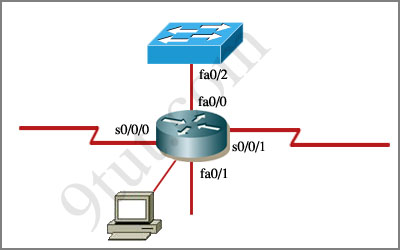
An administrator is trying to ping and telnet from Switch to Router with the results shown below:

Switch>
Switch> ping 10.4.4.3
Type escape sequence to abort.
Sending 5, 100-byte ICMP Echos to 10.4.4.3,timeout is 2 seconds:
.U.U.U
Success rate is 0 percent (0/5)
Switch>
Switch> telnet 10.4.4.3
Trying 10.4.4.3 …
% Destination unreachable; gateway or host down
Switch>

Click the console connected to Router and issue the appropriate commands to answer the questions.

Answer and Explanation

Note: If you are not sure about Access-list, please read my Access-list tutorial. You can also download this sim to practice (open with Packet Tracer) here: http://www.9tut.com/download/9tut.com_CCNA_Access_List_Sim.pkt

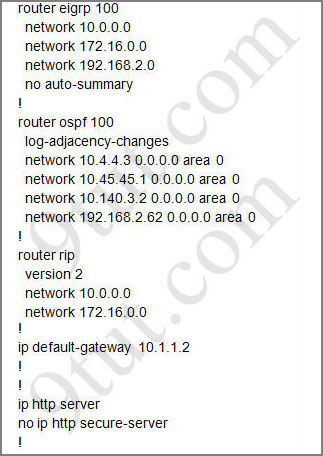
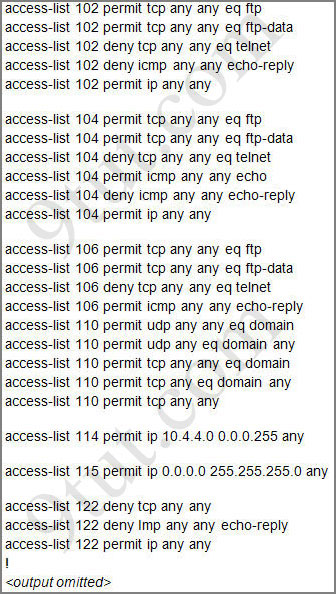
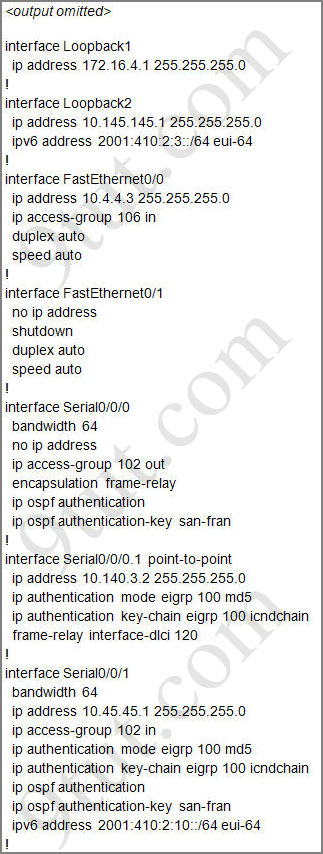
For this question we only need to use the show running-config command to answer all the questions below

Router>enable
Router#show running-config
accesslist_sim_showrun1

accesslist_sim_showrun2

accesslist_sim_showrun3

Question 1:

Which will fix the issue and allow ONLY ping to work while keeping telnet disabled?

A – Correctly assign an IP address to interface fa0/1
B – Change the ip access-group command on fa0/0 from “in” to “out”
C – Remove access-group 106 in from interface fa0/0 and add access-group 115 in.
D – Remove access-group 102 out from interface s0/0/0 and add access-group 114 in
E – Remove access-group 106 in from interface fa0/0 and add access-group 104 in


Answer: E


Explanation:

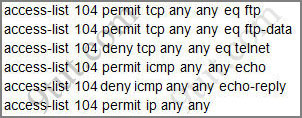
Let’s have a look at the access list 104:
accesslist_sim_answer1

The question does not ask about ftp traffic so we don’t care about the two first lines. The 3rd line denies all telnet traffic and the 4th line allows icmp traffic to be sent (ping). Remember that the access list 104 is applied on the inbound direction so the 5th line “access-list 104 deny icmp any any echo-reply” will not affect our icmp traffic because the “echo-reply” message will be sent over the outbound direction.

Question 2:

What would be the effect of issuing the command ip access-group 114 in to the fa0/0 interface?

A – Attempts to telnet to the router would fail
B – It would allow all traffic from the 10.4.4.0 network
C – IP traffic would be passed through the interface but TCP and UDP traffic would not
D – Routing protocol updates for the 10.4.4.0 network would not be accepted from the fa0/0 interface


Answer: B

Explanation:

From the output of access-list 114: access-list 114 permit ip 10.4.4.0 0.0.0.255 any we can easily understand that this access list allows all traffic (ip) from 10.4.4.0/24 network

Question 3:

What would be the effect of issuing the command access-group 115 in on the s0/0/1 interface?

A – No host could connect to Router through s0/0/1
B – Telnet and ping would work but routing updates would fail.
C – FTP, FTP-DATA, echo, and www would work but telnet would fail
D – Only traffic from the 10.4.4.0 network would pass through the interface


Answer: A

Explanation:

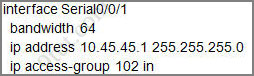
First let’s see what was configured on interface S0/0/1:
accesslist_sim_answer3

Recall that each interface only accepts one access-list, so when using the command “ip access-group 115 in” on the s0/0/1 interface it will overwrite the initial access-list 102. Therefore any telnet connection will be accepted (so we can eliminate answer C).
B is not correct because if telnet and ping can work then routing updates can, too.
D is not correct because access-list 115 does not mention about 10.4.4.0 network. So the most reasonable answer is A.

But here raise a question…

The wildcard mask of access-list 115, which is 255.255.255.0, means that only host with ip addresses in the form of x.x.x.0 will be accepted. But we all know that x.x.x.0 is likely to be a network address so the answer A: “no host could connect to Router through s0/0/1” seems right…

But what will happen if we don’t use a subnet mask of 255.255.255.0? For example we can use an ip address of 10.45.45.0 255.255.0.0, such a host with that ip address exists and we can connect to the router through that host. Now answer A seems incorrect!

Please comment if you have any idea for this sim!

Other lab-sims on this site:

CCNA NAT SIM Question 1

CCNA NAT SIM Question 2

CCNA Frame Relay Sim

CCNA Configuration SIM Question (RIPv2 SIM)

CCNA VTP SIM

CCNA EIGRP LAB

CCNA Drag and Drop SIM

CCNA Implementation SIM

Comments
Comment pages
1 7 8 9 39
  1. rajan maretha
    February 23rd, 2013

    pls send to me the ccna dumps.thanks in advance.

  2. m
    February 25th, 2013

    Question 1:

    Which will fix the issue and allow ONLY ping to work while keeping telnet disabled?

    A – Correctly assign an IP address to interface fa0/1
    B – Change the ip access-group command on fa0/0 from “in” to “out” <–seems to be correct
    m.

  3. NoDumps4You
    February 26th, 2013

    The easiest way to answer to Q3 is that there is an implicit deny at the end of the access list which we cannot see. Hence, all the traffic will be automatically blocked. I don’t know why people are writing gigantic answers just to answer Q3.

  4. oshawkat-Sudan
    March 2nd, 2013

    regarding Q1
    B-Change the ip access-group command on fa0/0 from “in” to “out
    not correct becuase this will allow telnet and ping as well.

  5. EnthusiatCCNA
    March 3rd, 2013

    I downloaded the pkt, regarding the Q3 it did not overide as i execute the command the s0/0/0 has now 2 ACL: ip access-group 115 in and ip access-group 102 out in the explanation it says override so in my unerstanding the first ACL will be read and the second ACL will just be ignored?

  6. EnthusiatCCNA
    March 3rd, 2013

    I downloaded the pkt, regarding the Q3 it did not overide as i execute the command the s0/0/0 has now 2 ACL: ip access-group 115 in and ip access-group 102 out in the explanation it says override so in my unerstanding the first ACL will be read and the second ACL will just be ignored?

  7. Ahmed
    March 3rd, 2013

    Does anyone out there have Packet Tracer 6 or later? Please send to aaegh7@gmail.com. My version (V5) does not support iBGP…I’m preparing for CCIE.
    Thanks in advance.

  8. CAHOP240
    March 5th, 2013

    @Enthusiast

    Check your directions. You can only have 1 access list per interface, per protocol, per direction. You have two ACLs on your interface because one is facing in and the other is facing out. The original question has ACL 102 IN. If you apply ACL 115 IN it will over write ACL 102

  9. going4CCNA
    March 7th, 2013

    is this lab subject to any changes during the exam? thank you very much.

  10. Nera
    March 8th, 2013

    plz tell me any one……..??? do we need to change the ACLz on that router….? or we can jus look at the ACLs and answer them…

  11. Anonymous
    March 14th, 2013

    @9tut Vindicated!!! Um, by virtue of actually reading your last statement on Question 3! :P I downloaded the Packet Tracer sim and just moved all the answers from Q1-Q3 to a separate text box and attempted to answer them by myself. That was somewhat of a mistake since I didn’t have the actual multiple choice answers and issued a command to modify the ACL instead of the ACL interface assignment. Regardless, when I got to question three, this is what I wrote:

    Q3: What would be the effect of issuing the command ip access-group 115 in on the
    s0/0/1 interface?
    My Answer: It would allow any host in whose last octet was 0.

    It seemed the most reasonable, precise answer I could think of. Perhaps you could save the current .pkt file as 9tut.com_CCNA_ACL_sim_question_Answered.pkt and place the multiple choice possibilities in 9tut.com_CCNA_ACL_sim_question.pkt file and zip them up like did with the NAT_sim_question. That would be my only request for this. Other than that, great lab. Thanks!

  12. jv
    March 18th, 2013

    Q3: i setup a lab..

    R1 ip 10.45.45.1/21 R2 ip 10.45.45.0/21 (direct connect)

    yes the .0 can ping .1.. but look at the question and answers..

    the answer “only traffic from NETWORK 10.4.4.0 would be allowed”

    Look at the config, the 10.4.4.0 is a /24, would 10.4.4.1 be able to ping thru? nope..

    Final answer, A..

  13. Elyor
    March 20th, 2013

    (Hardcover) Do you need help in trying to pass the ICND1 and CCNA exams? If you do, then this book is for you! Author Wendell Odom, has done an ottsuanding job of writing the third edition of a book that is designed to make you much more knowledgeable about how to do your job.Author Odom, begins by providing a basic introduction for those who are brand new to networking. Then, the author introduces the terminology surrounding two different networking architectures: TCP/IP and OSI. Next, he covers the concepts and terms used for the most popular option for the data link layer for local-area networks, namely Ethernet. The author also covers the concepts and terms used for the most popular options for the data link layer for wide-area networks, including High-Level Data Link Control, the Point-to-Point Protocol and Frame Relay. He continues by introducing the basics of IP, including IP addressing and routing. Then, the author introduces the basics of TCP and UDP. Next, he shows you how to access, examine, and configure Cisco Catalyst LAN switches. The author also shows you how to configure a variety of switch features, including duplex and speed, port security, securing the CLI, and the switch IP address. He continues by focusing on how to tell if the switch is doing what it is supposed to be doing, mainly through the use of show commands. Then, the author explains the basic operation concepts of wireless LANs, along with addressing some of the most common security concerns. Next, he walks through the entire concept of subnetting, from starting with a Class A, B, or C network, analyzing requirements, making choices, calculating the resulting subnets, assigning those on paper, all in preparation to deploy and use those subnets by configuring the devices. The author also explores all things related to address classes and the IP network concept created by those classes. He continues by showing you how to quickly and easily convert between the formats, so you can practice before having to think more about what the mask does. Then, the author shows you how to look at the mask to discover key facts, like the size of subnet and the number of subnets in the network. Next, he shows you how to find and analyze the subnet in which the that IP address resides, including finding the subnet ID, range of addresses in the subnet, and subnet broadcast address. The author also shows you how to find all of those subnet IDs, given a network number and a single mask used throughout the network. He continues by showing you how to configure IP addresses, static routes, and one routing protocol: RIP Version 2. Then, the author features a scenario that examines the IP packet forwarding process. Next, he covers the concepts of Network Address Translation. The author also focuses on a few small WAN configuration tasks, plus NAT configuration using Cisco Security Device Manager. Finally, he suggests a plan for final preparation once you have finished the core parts of the book, in particular explaining the many study options available in the book.This most excellent book uses several key methodologies to help you discover the exam topics on which you need more review; to help you fully understand and remember those details; and, to help you prove to yourself that you have retained your knowledge of those topics. Perhaps more importantly, this book does not try to help you pass the exams only by memorization, but by truly learning and understanding the topics.

  14. adil
    March 24th, 2013

    @9tut
    Question1: If we remove access-list 106 and use 102 in the same direction (IN), then it also gives the same result (i.e allow ping but deny telnet). Not sure how the exam will score it, but it seems to be valid option.

  15. adil
    March 24th, 2013

    @9tut
    More detail on my point. I first used acces-list 102. The ping attempts matched “permit ip any any line”

    RouterC(config-if)#do show acc
    Extended IP access list 102
    permit tcp any any eq ftp
    deny tcp any any eq telnet (12 match(es))
    deny icmp any any echo-reply
    permit ip any any (5 match(es))
    —-output omitted——-
    ============================

    Then I removed 102 and used 104. In this case ping attempts matched the “permit icmp any any echo”

    RouterC(config-if)#do show acc
    Extended IP access list 102
    permit tcp any any eq ftp
    deny tcp any any eq telnet (12 match(es))
    deny icmp any any echo-reply
    permit ip any any (5 match(es))
    Extended IP access list 104
    permit tcp any any eq ftp
    deny tcp any any eq telnet (12 match(es))
    permit icmp any any echo (5 match(es))
    deny icmp any any echo-reply
    permit ip any any

  16. GJ
    March 27th, 2013

    @9Tute

    Question 3:

    What would be the effect of issuing the command access-group 115 in on the s0/0/1 interface?

    ***** Is it “access-group 115 in” or “ip access-group 115 in”

    If “access-group 115 in” is the CMD, the old “ip access-group 102 in” will not be overwrite

  17. GJ
    March 27th, 2013

    if so Ans is C

  18. dd
    March 29th, 2013

    how many questions are there for this ACL lab in the real test?

  19. dd
    March 29th, 2013

    how many questions for this ACL lab in the real test?

  20. mazhar hussain
    April 3rd, 2013

    please some one send me licenced version of visual_certexam_suite_setup .i m thank full 2 u.my mailing add: its_md.5277@yahoo.com.

  21. yefter
    April 16th, 2013

    i just need to write this month pls i need reference

  22. andrew
    April 18th, 2013

    wow so difficulty ccna

  23. Hope
    April 25th, 2013

    Q3:

    note that access-lists use wild card bits and not subnet masks (wild card bits/mask is the opposite of subnet mask; you can get it by using the simple formula: 255.255.255.255 minus your subnet mask)

    note also that, while subnet mask is on the basis of matching network bits, wild card bits works on the basis of matching host bits.

    this can be simply explained thus:

    for subnet mask:
    0 means don’t care
    255 means must match

    for wild card bits:
    0 means must match
    255 means don’t care.

    having laid all those premises, we know that the network part of the address must match before we consider the host part but in the question, the first three octets says don’t care then the 4th octet say must match.

    I can bet you the router would be so confused that it will break down trying to tell you that you’re not a good master.

    If it was “access-list 115 permit ip 0.0.0.0 255.255.255.255″ the router would just simply translate it to “access-list 115 permit ip any any”.

    In conclusion, the answer is A

  24. Hope
    April 25th, 2013

    @GJ

    yes, it would work but note that cisco does not ask you what would work. Cisco wants you to answer the questions based on what they recommend. (Check Todd Lammle intro and exam tips, as well as cisco.com documentations for further explanation)

    Cisco says: the rule of ACL is one access list per interface per direction meaning, one ACL inbound on every interface and one ACL outbound on every interface.

    Cisco also lets you understand that the iOS obeys the last order/command

  25. osama
    April 26th, 2013

    please i need latest. ccna dumb … i’ll be really grateful if anyone cares
    my email elahly_egypt_2000@yahoo.com

  26. Arison
    April 29th, 2013

    @everyone

    Is this Lab on the CCNA exam or the ICDN1?

  27. Shark
    May 3rd, 2013

    Hi,

    Q3 – I think I can prove that answer A is OK…

    Sorry for a quite long post, but it was necessary to collect some outputs…
    I connected two CISCO routers CISCO2600 and R3800 via their ethernet ports (these routers don’t have serial ports)

    Router CISCO2600 is the one from the picture
    As it has only one fastEthernet port (which has been used for connectivity to R3800)
    so everything which refers to serial s0/0/1 on the SIM – refers to fa 0/0 in my config

    CISCO2600 running-config

    !
    interface FastEthernet0/0
    description Link to R3800
    ip address 10.45.45.1 255.255.255.0
    ip access-group 102 in
    no ip mroute-cache
    speed auto
    full-duplex
    !
    router eigrp 100
    network 10.0.0.0
    no auto-summary
    no eigrp log-neighbor-changes
    !
    router ospf 1
    log-adjacency-changes
    network 10.45.45.0 0.0.0.255 area 0
    !
    router rip
    version 2
    network 10.0.0.0
    no auto-summary
    !
    ip default-gateway 10.1.1.2

    !
    access-list 102 permit tcp any any eq ftp
    access-list 102 permit tcp any any eq ftp-data
    access-list 102 deny tcp any any eq telnet
    access-list 102 deny icmp any any echo-reply
    access-list 102 permit ip any any
    !
    access-list 115 permit ip 0.0.0.0 255.255.255.0 any
    !

    R3800 is the router connected to CISCO2600 via GigabitEthernet0/0 (10.45.45.0/24)
    GigabitEthernet0/1 has an address 172.16.1.1/16 and is connected to PC 172.16.1.0/16

    R3800 running config

    !
    interface GigabitEthernet0/0
    description Link to CISCO2600
    ip address 10.45.45.2 255.255.255.0
    duplex auto
    speed auto
    media-type rj45
    !
    interface GigabitEthernet0/1
    description Link to local LAN with PC 172.16.1.0/16
    ip address 172.16.1.1 255.255.0.0
    duplex auto
    speed auto
    media-type rj45
    !
    router eigrp 100
    network 10.0.0.0
    network 172.16.0.0
    !
    router ospf 1
    log-adjacency-changes
    network 10.45.45.0 0.0.0.255 area 0
    network 172.16.0.0 0.0.255.255 area 0
    !
    router rip
    version 2
    network 10.0.0.0
    network 172.16.0.0
    no auto-summary
    !

    ****************************************************************************************************************
    I did not paste all screens with ACL 102 applied to CISCO2600 – it works as it should…
    Just ping & telnet from PC 172.16.1.0/16

    CISCO2600#debug ip icmp
    ICMP packet debugging is on

    CISCO2600#
    00:01:30: ICMP: echo reply sent, src 10.45.45.1, dst 172.16.1.0
    00:01:31: ICMP: echo reply sent, src 10.45.45.1, dst 172.16.1.0
    CISCO2600#
    00:01:32: ICMP: echo reply sent, src 10.45.45.1, dst 172.16.1.0
    00:01:33: ICMP: echo reply sent, src 10.45.45.1, dst 172.16.1.0
    CISCO2600#

    CISCO2600#
    00:02:27: ICMP: dst (10.45.45.1) administratively prohibited unreachable sent to 172.16.1.0
    CISCO2600#
    00:02:30: ICMP: dst (10.45.45.1) administratively prohibited unreachable sent to 172.16.1.0
    CISCO2600#
    00:02:36: ICMP: dst (10.45.45.1) administratively prohibited unreachable sent to 172.16.1.0
    CISCO2600#

    ping from R3800 to CISCO2600

    R3800#ping 10.45.45.1

    Type escape sequence to abort.
    Sending 5, 100-byte ICMP Echos to 10.45.45.1, timeout is 2 seconds:
    !!!!!
    Success rate is 100 percent (5/5), round-trip min/avg/max = 1/2/4 ms

    CISCO2600#
    00:35:24: ICMP: echo reply sent, src 10.45.45.1, dst 10.45.45.2
    00:35:24: ICMP: echo reply sent, src 10.45.45.1, dst 10.45.45.2
    00:35:24: ICMP: echo reply sent, src 10.45.45.1, dst 10.45.45.2
    00:35:24: ICMP: echo reply sent, src 10.45.45.1, dst 10.45.45.2
    00:35:24: ICMP: echo reply sent, src 10.45.45.1, dst 10.45.45.2

    telnet from R3800 to CISCO2600

    R3800#telnet 10.45.45.1
    Trying 10.45.45.1 …
    % Destination unreachable; gateway or host down

    CISCO2600#
    00:36:43: ICMP: dst (10.45.45.1) administratively prohibited unreachable sent to 10.45.45.2
    CISCO2600#

    ***************************************************************************************************************
    What is most important: what will happen when we allpy ACL 115 ?
    I collected some debug outputs from CISCO2600, let’s see

    01:26:50: RIP-TIMER: periodic timer expired
    01:26:50: RIP: sending v2 update to 224.0.0.9 via FastEthernet0/0 (10.45.45.1)
    01:26:50: RIP: build update entries – suppressing null update
    01:26:51: IP: s=10.45.45.2 (FastEthernet0/0), d=224.0.0.10, len 60, rcvd 2
    01:26:51: IP: s=10.45.45.1 (local), d=224.0.0.5 (FastEthernet0/0), len 68, sending broad/multicast
    01:26:53: IP: s=10.45.45.1 (local), d=224.0.0.10 (FastEthernet0/0), len 60, sending broad/multicast
    01:26:53: %SYS-5-CONFIG_I: Configured from console by console
    01:26:54: IP: s=10.45.45.2 (FastEthernet0/0), d=224.0.0.5, len 80, rcvd 0
    01:26:56: IP: s=10.45.45.2 (FastEthernet0/0), d=224.0.0.10, len 60, rcvd 2

    CISCO2600#show ip route
    Codes: C – connected, S – static, I – IGRP, R – RIP, M – mobile, B – BGP
    D – EIGRP, EX – EIGRP external, O – OSPF, IA – OSPF inter area
    N1 – OSPF NSSA external type 1, N2 – OSPF NSSA external type 2
    E1 – OSPF external type 1, E2 – OSPF external type 2, E – EGP
    i – IS-IS, L1 – IS-IS level-1, L2 – IS-IS level-2, ia – IS-IS inter area
    * – candidate default, U – per-user static route, o – ODR
    P – periodic downloaded static route

    Gateway of last resort is not set

    D 172.16.0.0/16 [90/28416] via 10.45.45.2, 00:01:28, FastEthernet0/0
    10.0.0.0/24 is subnetted, 1 subnets
    C 10.45.45.0 is directly connected, FastEthernet0/0

    01:26:58: IP: s=10.45.45.1 (local), d=224.0.0.10 (FastEthernet0/0), len 60, sending broad/multicast
    01:27:00: IP: s=10.45.45.2 (FastEthernet0/0), d=224.0.0.10, len 60, rcvd 2
    01:27:01: IP: s=10.45.45.1 (local), d=224.0.0.5 (FastEthernet0/0), len 68, sending broad/multicast
    01:27:02: IP: s=10.45.45.1 (local), d=224.0.0.10 (FastEthernet0/0), len 60, sending broad/multicast
    01:27:03: IP: s=10.45.45.2 (FastEthernet0/0), d=224.0.0.5, len 80, rcvd 0
    01:27:05: IP: s=10.45.45.2 (FastEthernet0/0), d=224.0.0.10, len 60, rcvd 2
    01:27:06: IP: s=10.45.45.1 (local), d=224.0.0.10 (FastEthernet0/0), len 60, sending broad/multicast
    01:27:10: IP: s=10.45.45.2 (FastEthernet0/0), d=224.0.0.10, len 60, rcvd 2
    01:27:11: IP: s=10.45.45.1 (local), d=224.0.0.10 (FastEthernet0/0), len 60, sending broad/multicast
    01:27:11: IP: s=10.45.45.1 (local), d=224.0.0.5 (FastEthernet0/0), len 68, sending broad/multicast
    01:27:12: IP: s=10.45.45.2 (FastEthernet0/0), d=224.0.0.5, len 80, rcvd 0
    01:27:14: IP: s=10.45.45.2 (FastEthernet0/0), d=224.0.0.10, len 60, rcvd 2

    01:27:14: IP: s=10.45.45.2 (FastEthernet0/0), d=224.0.0.9, len 52, rcvd 2
    01:27:14: RIP: received v2 update from 10.45.45.2 on FastEthernet0/0
    01:27:14: 172.16.0.0/16 via 0.0.0.0 in 1 hops
    01:27:14: RIP: Update contains 1 routes

    01:27:16: IP: s=10.45.45.1 (local), d=224.0.0.10 (FastEthernet0/0), len 60, sending broad/multicast
    01:27:19: IP: s=10.45.45.2 (FastEthernet0/0), d=224.0.0.10, len 60, rcvd 2
    01:27:19: RIP-TIMER: periodic timer expired
    01:27:19: RIP: sending v2 update to 224.0.0.9 via FastEthernet0/0 (10.45.45.1)
    01:27:19: RIP: build update entries – suppressing null update
    01:27:21: IP: s=10.45.45.1 (local), d=224.0.0.10 (FastEthernet0/0), len 60, sending broad/multicast
    01:27:21: IP: s=10.45.45.1 (local), d=224.0.0.5 (FastEthernet0/0), len 68, sending broad/multicast
    01:27:21: IP: s=10.45.45.2 (FastEthernet0/0), d=224.0.0.5, len 80, rcvd 0

    CISCO2600(config-if)#ip access-group 115 in

    01:27:23: IP: s=10.45.45.2 (FastEthernet0/0), d=224.0.0.10, len 60, access denied
    01:27:25: IP: s=10.45.45.1 (local), d=224.0.0.10 (FastEthernet0/0), len 60, sending broad/multicast
    01:27:28: IP: s=10.45.45.2 (FastEthernet0/0), d=224.0.0.10, len 60, access denied
    01:27:30: IP: s=10.45.45.1 (local), d=224.0.0.10 (FastEthernet0/0), len 60, sending broad/multicast
    01:27:31: IP: s=10.45.45.1 (local), d=224.0.0.5 (FastEthernet0/0), len 68, sending broad/multicast
    01:27:31: IP: s=10.45.45.2 (FastEthernet0/0), d=224.0.0.5, len 80, access denied
    01:27:32: IP: s=10.45.45.2 (FastEthernet0/0), d=224.0.0.10, len 60, access denied

    01:27:34: RT: delete route to 172.16.0.0 via 10.45.45.2, eigrp metric [90/28416]
    01:27:34: RT: no routes to 172.16.0.0
    01:27:34: RT: delete network route to 172.16.0.0
    01:27:34: RT: add 172.16.0.0/16 via 10.45.45.2, ospf metric [110/2]

    01:27:35: IP: s=10.45.45.1 (local), d=224.0.0.10 (FastEthernet0/0), len 60, sending broad/multicast
    01:27:37: IP: s=10.45.45.2 (FastEthernet0/0), d=224.0.0.10, len 60, access denied
    01:27:40: IP: s=10.45.45.1 (local), d=224.0.0.10 (FastEthernet0/0), len 60, sending broad/multicast
    01:27:41: IP: s=10.45.45.2 (FastEthernet0/0), d=224.0.0.5, len 80, access denied
    01:27:41: IP: s=10.45.45.1 (local), d=224.0.0.5 (FastEthernet0/0), len 68, sending broad/multicast
    01:27:42: IP: s=10.45.45.2 (FastEthernet0/0), d=224.0.0.10, len 60, access denied
    01:27:45: IP: s=10.45.45.1 (local), d=224.0.0.10 (FastEthernet0/0), len 60, sending broad/multicast
    01:27:46: IP: s=10.45.45.2 (FastEthernet0/0), d=224.0.0.10, len 60, access denied
    01:27:47: RIP-TIMER: periodic timer expired
    01:27:47: RIP: sending v2 update to 224.0.0.9 via FastEthernet0/0 (10.45.45.1)
    01:27:47: RIP: build update entries – suppressing null update
    01:27:49: IP: s=10.45.45.1 (local), d=224.0.0.10 (FastEthernet0/0), len 60, sending broad/multicast
    01:27:50: IP: s=10.45.45.2 (FastEthernet0/0), d=224.0.0.5, len 80, access denied
    01:27:51: IP: s=10.45.45.2 (FastEthernet0/0), d=224.0.0.10, len 60, access denied
    01:27:51: IP: s=10.45.45.1 (local), d=224.0.0.5 (FastEthernet0/0), len 68, sending broad/multicast
    01:27:54: IP: s=10.45.45.1 (local), d=224.0.0.10 (FastEthernet0/0), len 60, sending broad/multicast
    01:27:55: IP: s=10.45.45.2 (FastEthernet0/0), d=224.0.0.10, len 60, access denied
    01:27:58: IP: s=10.45.45.1 (local), d=224.0.0.10 (FastEthernet0/0), len 60, sending broad/multicast
    01:27:59: IP: s=10.45.45.2 (FastEthernet0/0), d=224.0.0.5, len 80, access denied
    01:28:00: IP: s=10.45.45.2 (FastEthernet0/0), d=224.0.0.10, len 60, access denied
    01:28:01: IP: s=10.45.45.1 (local), d=224.0.0.5 (FastEthernet0/0), len 68, sending broad/multicast

    01:28:01: %OSPF-5-ADJCHG: Process 1, Nbr 172.16.1.1 on FastEthernet0/0 from FULL to DOWN, Neighbor Down: Dead timer expired

    01:28:03: IP: s=10.45.45.1 (local), d=224.0.0.10 (FastEthernet0/0), len 60, sending broad/multicast
    01:28:04: IP: s=10.45.45.2 (FastEthernet0/0), d=224.0.0.10, len 60, access denied

    01:28:07: RT: del 172.16.0.0 via 10.45.45.2, ospf metric [110/2]
    01:28:07: RT: delete network route to 172.16.0.0
    01:28:07: IP: s=10.45.45.1 (local), d=224.0.0.10 (FastEthernet0/0), len 60, sending broad/multicast

    01:28:09: IP: s=10.45.45.2 (FastEthernet0/0), d=224.0.0.10, len 60, access denied
    01:28:09: IP: s=10.45.45.2 (FastEthernet0/0), d=224.0.0.5, len 80, access denied

    01:28:10: IP: s=10.45.45.2 (FastEthernet0/0), d=224.0.0.9, len 52, access denied

    01:28:11: IP: s=10.45.45.1 (local), d=224.0.0.5 (FastEthernet0/0), len 64, sending broad/multicast
    01:28:11: IP: s=10.45.45.2 (FastEthernet0/0), d=10.45.45.1, len 80, access denied
    01:28:11: IP: s=10.45.45.1 (local), d=10.45.45.2 (FastEthernet0/0), len 56, sending
    01:28:12: IP: s=10.45.45.1 (local), d=224.0.0.10 (FastEthernet0/0), len 60, sending broad/multicast
    01:28:13: RIP-TIMER: periodic timer expired
    01:28:13: RIP: sending v2 update to 224.0.0.9 via FastEthernet0/0 (10.45.45.1)
    01:28:13: RIP: build update entries – suppressing null update
    01:28:14: IP: s=10.45.45.2 (FastEthernet0/0), d=224.0.0.10, len 60, access denied
    01:28:17: IP: s=10.45.45.1 (local), d=224.0.0.10 (FastEthernet0/0), len 60, sending broad/multicast
    01:28:19: IP: s=10.45.45.2 (FastEthernet0/0), d=224.0.0.10, len 60, access denied
    01:28:19: IP: s=10.45.45.2 (FastEthernet0/0), d=224.0.0.5, len 80, access denied
    01:28:21: IP: s=10.45.45.1 (local), d=224.0.0.5 (FastEthernet0/0), len 64, sending broad/multicast
    01:28:21: IP: s=10.45.45.2 (FastEthernet0/0), d=10.45.45.1, len 80, access denied
    01:28:21: IP: s=10.45.45.1 (local), d=10.45.45.2 (FastEthernet0/0), len 56, sending
    01:28:21: IP: s=10.45.45.1 (local), d=224.0.0.10 (FastEthernet0/0), len 60, sending broad/multicast
    01:28:23: IP: s=10.45.45.2 (FastEthernet0/0), d=224.0.0.10, len 60, access denied
    01:28:26: IP: s=10.45.45.1 (local), d=224.0.0.10 (FastEthernet0/0), len 60, sending broad/multicast
    01:28:27: IP: s=10.45.45.2 (FastEthernet0/0), d=224.0.0.10, len 60, access denied
    01:28:28: IP: s=10.45.45.2 (FastEthernet0/0), d=224.0.0.5, len 80, access denied
    01:28:31: IP: s=10.45.45.1 (local), d=224.0.0.10 (FastEthernet0/0), len 60, sending broad/multicast
    01:28:31: IP: s=10.45.45.1 (local), d=224.0.0.5 (FastEthernet0/0), len 64, sending broad/multicast
    01:28:31: IP: s=10.45.45.2 (FastEthernet0/0), d=10.45.45.1, len 80, access denied
    01:28:31: IP: s=10.45.45.1 (local), d=10.45.45.2 (FastEthernet0/0), len 56, sending

    CISCO2600#show ip route
    Codes: C – connected, S – static, I – IGRP, R – RIP, M – mobile, B – BGP
    D – EIGRP, EX – EIGRP external, O – OSPF, IA – OSPF inter area
    N1 – OSPF NSSA external type 1, N2 – OSPF NSSA external type 2
    E1 – OSPF external type 1, E2 – OSPF external type 2, E – EGP
    i – IS-IS, L1 – IS-IS level-1, L2 – IS-IS level-2, ia – IS-IS inter area
    * – candidate default, U – per-user static route, o – ODR
    P – periodic downloaded static route

    Gateway of last resort is not set

    10.0.0.0/24 is subnetted, 1 subnets
    C 10.45.45.0 is directly connected, FastEthernet0/0
    CISCO2600#

    ****************************************************************************
    ping from PC 172.16.1.0 to CISCO2600 10.45.45.1

    01:35:56: IP: s=10.45.45.1 (local), d=172.16.1.0, len 60, unroutable

    telnet from PC 172.16.1.0 to CISCO2600 10.45.45.1

    02:05:37: IP: s=10.45.45.1 (local), d=172.16.1.0, len 44, unroutable

    ping from R3800 to CISCO2600

    R3800#ping 10.45.45.1

    Type escape sequence to abort.
    Sending 5, 100-byte ICMP Echos to 10.45.45.1, timeout is 2 seconds:
    U.U.U
    Success rate is 0 percent (0/5)

    CISCO2600#
    00:43:26: ICMP: dst (10.45.45.1) administratively prohibited unreachable sent to 10.45.45.2
    00:43:28: ICMP: dst (10.45.45.1) administratively prohibited unreachable sent to 10.45.45.2
    00:43:30: ICMP: dst (10.45.45.1) administratively prohibited unreachable sent to 10.45.45.2
    00:43:53: ICMP: dst (10.45.45.1) administratively prohibited unreachable sent to 10.45.45.2

    ************************************************************************************************************************

    Come back to the the Q3

    What would be the effect of issuing the command access-group 115 in on the s0/0/1 interface?

    A – No host could connect to Router through s0/0/1
    B – Telnet and ping would work but routing updates would fail.
    C – FTP, FTP-DATA, echo, and www would work but telnet would fail
    D – Only traffic from the 10.4.4.0 network would pass through the interface

    Why answer A seems to be OK?

    Because all routing protocol packets from R3800 are being sent to 224.0.0.5, 224.0.0.9, 224.0.0.10
    and all those packets are dropped on CISCO2600 due to ACL115.
    As a result, all routing protocols (RIP, EIGRP, OSPF) on CISCO2600 lost their routes to 172.16.0.0

    However, ping from PC 172.16.1.0/16 WILL arrive to CISCO2600,
    but, CISCO2600 DOES NOT have route back to 172.16.0.0 !!!
    I’m not an expert, but I think ‘ip default-gateway 10.1.1.2′ is not enough.
    No default routes, no static routes.
    It has locally connected network 10.45.45.0/24 only.
    But ping from R3800 10.45.45.2 are dropped on CISCO2600 due to ACL115

    SIMPLE… isn’t ?

    In fact, answer B is ‘partially’ correct…
    I mean, when we apply ACL155, then PC 172.16.1.0/16 IS (!) able to ping and telnet to CISCO2600.
    Why? Just because ip route 172.16.0.0 is not immediatelly removed from CISCO2600 routing table.
    It takes some time… till routing protocols’ timers expire…

    In case I did any mistake, pls correct me.

  28. ehasima
    May 6th, 2013

    I failed my exam. please send me the latest dump in “ehasima@hotmail.com”

    thanks a lot…

  29. coi
    May 8th, 2013

    In Q1 I think B – Change the ip access-group command on fa0/0 from “in” to “out” is valid.
    I know it does refers to 106, but it says “change access-group on f0/0″, and the access-group there is 106….so changing 106 in to out solve is question as well

  30. iza
    May 9th, 2013

    @coi I think if you’ll just change the direction of access-group 106 from in to out,you won’t be able to meet the requirement to allow ping to work. from access-list 106, it is not defined to allow icmp traffic from outside interface f0/0 and everything not defined in the access list will be deny all.

    anyone, please correct me if i’m wrong. thanks

  31. Abbiemoh
    May 10th, 2013

    All valid questions on this website – failed with 20 marks. EIGRP – AS#, Access list – creating and applying, VTP – gathering information.

  32. Louise
    May 12th, 2013

    In such questions, can we just answer the questions without changing the access list on the router????
    Please reply…
    Thanks

  33. wow…CCNA is very hard
    May 18th, 2013

    I took the CCNA exam way back in the yr 2000 and it was tough to pass back then. Now, is 10x worse than it was back then!

  34. kk
    May 20th, 2013

    iam writing ccna next week- im still preparing. please send me latest sakhar dumps in pdf.

    email coodsie@yahoo.com

    or vce with crack thank u

  35. LR713
    May 20th, 2013

    Passed Exam two days ago. Labes were: Access List 1, Access List 2 (Modification 2), and EIGRP.

    Score 945/1000. Thanks 9TUT!

  36. David Okeri
    May 22nd, 2013

    To sit for the ccna exam next month and i real need dumps pliz anyone with,send to email:olesimbe@yahoo.com. Thanks a lot!!.

  37. MooseMeat
    May 22nd, 2013

    Gents – study is key to passing and understanding concept and theory! You can have the exam in front of you and fail if you don’t understand… this site is basically a gift for anyone determined to pass and accept the time it takes to learn, 3 months minimum of reading and understanding. cheers! writing on Friday…

Comment pages
1 7 8 9 39
  1. No trackbacks yet.
Add a Comment