
Home > CCNA – Subnetting Questions 3

CCNA – Subnetting Questions 3

January 8th, 2011 Go to comments

Here you will find answers to Subnetting Questions – Part 3

Note: If you are not sure about Subnetting, please read my Subnetting tutorial.

Question 1

Workstation A has been assigned an IP address of 192.0.2.24/28. Workstation B has been assigned an IP address of 192.0.2.100/28. The two workstations are connected with a straight-through cable. Attempts to ping between the hosts are unsuccessful. What two things can be done to allow communications between the hosts? (Choose two)

A. Replace the straight-through cable with a crossover cable.
B. Change the subnet mask of the hosts to /25.
C. Change the subnet mask of the hosts to /26.
D. Change the address of Workstation A to 192.0.2.15.
E. Change the address of Workstation B to 192.0.2.111.


Answer: A B

Explanation

To specify when we use crossover cable or straight-through cable, we should remember:
Group 1: Router, Host, Server
Group 2: Hub, Switch
One device in group 1 + One device in group 2: use straight-through cable
Two devices in the same group: use crossover cable

-> To connect two hosts we must use crossover cable -> A is correct.

With the subnet mask of /28, 192.0.2.24 & 192.0.2.100 will be in different subnets (192.0.2.24 belongs to subnet 192.0.2.16/28; 192.0.2.100 belongs to subnet 192.0.2.96). To make them in the same subnet we need more space for host. Because 100 < 128 so we the suitable subnet should be /25.

Question 2

Your ISP has given you the address 223.5.14.6/29 to assign to your router’s interface. They have also given you the default gateway address of 223.5.14.7. After you have configured the address, the router is unable to ping any remote devices. What is preventing the router from pinging remote devices?

A. The default gateway is not an address on this subnet.
B. The default gateway is the broadcast address for this subnet.
C. The IP address is the broadcast address for this subnet.
D. The IP address is an invalid class D multicast address.


Answer: B

Explanation

For the network 223.5.14.6/29:

Increment: 8
Network address: 223.5.14.0
Broadcast address: 223.5.14.7

-> The default gateway IP address is the broadcast address of this subnet -> B is correct.

Question 3

Refer to the exhibit. According to the routing table, where will the router send a packet destined for 10.1.5.65?

Network Interface Next-hop
10.1.1.0/24 e0 directly connected
10.1.2.0/24 e1 directly connected
10.1.3.0/25 s0 directly connected
10.1.4.0/24 s1 directly connected
10.1.5.0/24 e0 10.1.1.2
10.1.5.64/28 e1 10.1.2.2
10.1.5.64/29 s0 10.1.3.3
10.1.5.64/27 s1 10.1.4.4

A. 10.1.1.2
B. 10.1.2.2
C. 10.1.3.3
D. 10.1.4.4


Answer: C

Explanation

The destination IP address 10.1.5.65 belongs to 10.1.5.64/28, 10.1.5.64/29 & 10.1.5.64/27 subnets but the “longest prefix match” algorithm will choose the most specific subnet mask -> the prefix “/29″ will be chosen to route the packet. Therefore the next-hop should be 10.1.3.3 -> C is correct.

Question 4

Refer to the exhibit. The user at Workstation B reports that Server A cannot be reached. What is preventing Workstation B from reaching Server A?
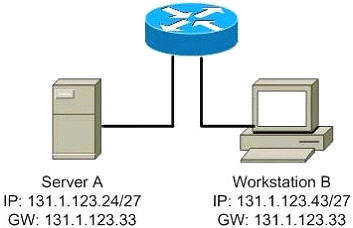
subnetting_gateway.jpg

A. The IP address for Server A is a broadcast address.
B. The IP address for Workstation B is a subnet address.
C. The gateway for Workstation B is not on the same subnet.
D. The gateway for Server A is not on the same subnet.


Answer: D

Question 5

Given the address 192.168.20.19/28, which of the following are valid host addresses on this subnet? (Choose two)

A. 192.168.20.29
B. 192.168.20.16
C. 192.168.20.17
D. 192.168.20.31
E. 192.168.20.0


Answer: A C

Question 6

Which of the following IP addresses fall into the CIDR block of 115.64.4.0/22? (Choose three)

A. 115.64.8.32
B. 115.64.7.64
C. 115.64.6.255
D. 115.64.3.255
E. 115.64.5.128
F. 115.64.12.128


Answer: B C E

Question 7

The Ethernet networks connected to router R1 in the graphic have been summarized for router R2 as 192.1.144.0/20. Which of the following packet destination addresses will R2 forward to R1, according to this summary? (Choose two)
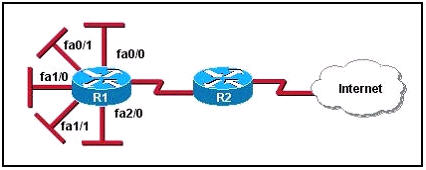
IP_summarize.jpg

A. 192.1.159.2
B. 192.1.160.11
C. 192.1.138.41
D. 192.1.151.254
E. 192.1.143.145
F. 192.1.1.144


Answer: A D

Question 8

Refer to the exhibit. All of the routers in the network are configured with the ip subnet-zero command. Which network addresses should be used for Link A and Network A? (Choose two)
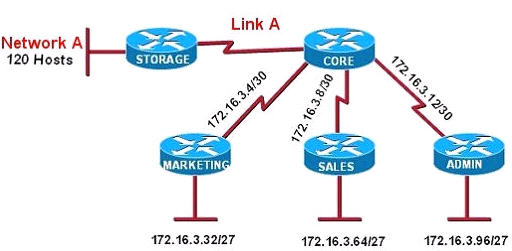
Subnetting_divide_hosts.jpg

A. Network A – 172.16.3.48/26
B. Network A – 172.16.3.128/25
C. Network A – 172.16.3.192/26
D. Link A – 172.16.3.0/30
E. Link A – 172.16.3.40/30
F. Link A – 172.16.3.112/30


Answer: B D

Explanation

Network A needs 120 hosts < 128 = 27 -> Need a subnet mask of 7 bit 0s -> “/25″.

Because the ip subnet-zero command is used, network 172.16.3.0/30 can be used.

Answer E “Link A – 172.16.3.40/30″ is not correct because this subnet belongs to MARKETING subnet (172.16.3.32/27).
Answer F “Link A – 172.16.3.112/30″ is not correct because this subnet belongs to ADMIN subnet (172.16.3.96/27).

Question 9

Which two subnetworks would be included in the summarized address of 172.31.80.0/20? (Choose two)

A. 172.31.17.4/30
B. 172.31.51.16 /30
C. 172.31.64.0/18
D. 172.31.80.0/22
E. 172.31.92.0/22
F. 172.31.192.0/18


Answer: D E

Explanation

From the summarized address of 172.31.80.0/20, we find the range of this summarized network:

Increment: 16
Network address: 172.31.80.0
Broadcast address: 172.31.95.255

-> Answer D & E belong to this range so they are the correct answers.

Question 10

Which three IP addresses can be assigned to hosts if the subnet mask is /27 and subnet zero is usable? (Choose three)

A. 10.15.32.17
B. 17.15.66.128
C. 66.55.128.1
D. 135.1.64.34
E. 129.33.192.192
F. 192.168.5.63


Answer: A C D

Explanation

First we need to find out the forms of network addresses and broadcast addresses when the subnet mask of /27 is used:

Increment: 32
Network address: In the form of x.x.x.(0,32,64,96,128,160,192,224)
Broadcast address: In the form of x.x.x.(31,63,95,127,159,191,223)
So we only need to check the fourth octets of the IP addresses above. If they are not in the form of network addresses or broadcast addresses then they can be assigned to hosts.

Notice that the IP 66.55.128.1 belongs to the subnet zero and the question says subnet zero is usable so it is valid.

Question 11

Which of the following IP addresses can be assigned to the host devices? (Choose two)

A. 205.7.8.32/27
B. 191.168.10.2/23
C. 127.0.0.1
D. 224.0.0.10
E. 203.123.45.47/28
F. 10.10.0.0/13


Answer: B F

Explanation

This is a time-consuming question (but not hard ^^) because we have to calculate the range of each sub-network separately (excepting answer C is the local loopback address & answer D is a multicast address) so make sure you can do subnet quickly. After solving above questions I believe you can find out the result so I don’t explain this question in detail.

Question 12

How many subnets can be gained by subnetting 172.17.32.0/23 into a /27 mask, and how many usable host addresses will there be per subnet?

A. 8 subnets, 31 hosts
B. 8 subnets, 32 hosts
C. 16 subnets, 30 hosts
D. 16 subnets, 32 hosts
E. A Class B address cant be subnetted into the fourth octet.


Answer: C

Explanation

Subnetting from /23 to /27 gives us 27 – 23 = 4 bits -> 24 = 16 subnets.

/27 has 5 bit 0s so it gives 25 – 2 = 30 hosts-per-subnet.

Comments (89) Comments
  1. balaji
    October 13th, 2011

    Which three IP addresses can be assigned to hosts if the subnet mask is /27 and subnet zero is usable? (Choose three)

    A. 10.15.32.17
    B. 17.15.66.128
    C. 66.55.128.1
    D. 135.1.64.34
    E. 129.33.192.192
    F. 192.168.5.63
    CAN U EXPLAIN

  2. xallax
    October 13th, 2011

    @balaji
    the ip has to be valid on a subnet that has the mask of 255.255.255.224
    subnet zero is enabled (by default) so we can use the very first subnet too

    A is valid
    B is a subnet ID (multiple of 32), invalid
    C is valid
    D is valid
    E same as B, invalid
    F is the broadcast IP (N*32-1), invalid

  3. 9tut
    October 13th, 2011

    @balaji: I added explanation to that question, please check again.

  4. Dudeds
    October 14th, 2011

    Thanks for posting all these! :)

  5. hawaas
    October 14th, 2011

    we can use ….

    A.10.15.32.17
    C.66.55.128.1
    D.135.1.64.34
    after that
    B. 17.15.66.128 is Subnet
    E. 129.33.192.192 is Subnet
    F. 192.168.5.63 is broadcast address

  6. mike
    October 16th, 2011

    where is the explanation for question no. 7?

  7. johncc42
    October 16th, 2011

    question 12: /23 has 2^7 =128 subnets and /27 has 2^11=2048 subnets. It gains 2048-128=1920, how could it be just 16 subnets?

    Please help!!!

  8. xallax
    October 16th, 2011

    @johncc42
    let’s take this network: 150.150.0.0 /16
    this is a random public class B full network.

    if we had it subnetted with a /23 mask then we had: 2^23 : 2^16 = 2^7 subnets = 128 subnets
    if we had it subnetted with a /27 mask then we had: 2^27 : 2^16 = 2^11 subnets = 2048 subnets.
    so far so good

    now…
    if i take a subnetwork like… 150.150.150.128 /23 and apply it a mask of /27…
    i get 2^27 : 2^23 = 2^4 = 16 subnets

    easy! :)

  9. Syed Kashif Shahab
    October 17th, 2011

    @mike
    Q.7:
    The summarized address is 192.1.144.0/20
    Solution:
    Network bits Host bits
    128 64 32 16 8 4 2 1
    144 = 1 0 0 1 0 0 0 0
    159= 1 0 0 1 1 1 1 1
    151= 1 0 0 1 0 1 1 1
    160= 1 0 1 0 0 0 0 0 160 is too high value.
    138= 1 0 0 0 1 0 1 0 less than 144
    143= 1 0 0 0 1 1 1 1 less than 144
    Forget the right handside (host bits) bits, you don’t even need to accomplish that…just fill left side (network side) with binary numbers
    Since in 192.1.144.0/20 1st octet and second octet’s whole bits are in network(16 bits) we don’t touch that. Third octet’s 4 bits gone to network and 4 bits remained in hosts so we would open this octet as elucidated above by opening up the third octet value i.e. 144. 1 0 0 1 came as the actual binary value of 144. From options, select third octet value and open them as I showed you above. if they match 1 0 0 1 then Router B will forward those packets to Router A coz they are encompassed in this summary =>> 192.1.144.0/20

    Note: To save time remember to deduct those of those 3rd octet values from the options which are less than the summarized one’s third octet value which is 144. Because 144 cannot encompass those which are less than 144.

  10. Syed Kashif Shahab
    October 17th, 2011

    @mike sorry mates….previous one just got smashed….Posted again…
    Q.7:
    The summarized address is 192.1.144.0/20
    Solution:
    Network bits | Host bits
    128 64 32 16 | 8 4 2 1
    144 = 1 0 0 1 | 0 0 0 0
    159= 1 0 0 1 | 1 1 1 1
    151= 1 0 0 1 | 0 1 1 1
    160= 1 0 1 0 | 0 0 0 0 === 160 is too high value.
    138= 1 0 0 0 | 1 0 1 0 === less than 144
    143= 1 0 0 0 | 1 1 1 1 === less than 144
    |
    Forget the right handside (host bits) bits, you don’t even need to accomplish that…just fill left side (network side) with binary numbers

    Since in 192.1.144.0/20 1st octet and second octet’s whole bits are in network(16 bits) we don’t touch that. Third octet’s 4 bits gone to network and 4 bits remained in hosts so we would open this octet as elucidated above by opening up the third octet value i.e. 144 the binary of which is 1 0 0 1. From options, select third octet value and open them as I showed you above. if they match 1 0 0 1 then Router B will forward those packets to Router A coz they are encompassed in this summary =>> 192.1.144.0/20

    Note: To save time remember to deduct those of 3rd octet values from the options which are less than the summarized one’s third octet value which is 144. Because 144 cannot encompass those which are less than 144.

  11. Syed Kashif Shahab
    October 17th, 2011

    i am unable to post it in a format as i wanted to post it….. 128 64 32…… all values are appearing at the rightmost side and thus its corresponding binary numbers seem to be out of order…if any one has any problem with the question explained….and he cant get it due to illegibility. send me your email addresses i will send it to you in word doc.
    syedkashifshahab@hotmail.co.uk

  12. JB
    October 22nd, 2011

    @Xallax kindly check question 3.
    In binary form when we write /27, /28 and /29 then compare the left bits to 10.1.5.65 then /27 has more matching bits and should be elected as the best route. Kindly clarify

  13. xallax
    October 22nd, 2011

    @jb
    hello
    /27 is 1111 1111.1111 1111.1111 1111.1110 0000 <= 27 bits
    /29 is 1111 1111.1111 1111.1111 1111.1111 1000 <= 29 bits

    /29 has more used bits on the network side, thus it will be a more specific mask to use.

    thank you for asking, have a nice weekend

  14. Anonymous
    October 26th, 2011

    please i need explananion for question number7 please!!

  15. DimS
    November 2nd, 2011

    @Anonymous:
    Network 192.1.144.0 – is a C-class network. Netmask /20 combines networks from 192.1.144.0 to 192.1.159.0 (24-20=4 2^4=16) and hosts 192.1.144.1 – 192.1.159.254
    So right answers are:
    A. 192.1.159.2
    D. 192.1.151.254

  16. MB
    November 4th, 2011

    can anyone explain for me Q3 ? plz

  17. Koffy
    November 4th, 2011

    @MB

    This is where you apply the “Longest Prefix Match”
    When the router has multiple route to forward a packet. The router will run a search in its routing table and chooses the longest prefix match. (The matching right most bits)

    The idea of the Longest Prefix Match will always result in the route with the smallest mask.
    For instance, the bigger the number after this sign “/” the smaller the mask, and the longer the prefix match.(The matching right most bits)
    For example, /24 has a bigger mask than /29, but /29 has the longest prefix match than /24 so on and so on………

    Look closely at the routing table. During the search, the router realizes that network 10.1.5.64/29 has the smallest mask and therefore has the longest prefix match. The router chooses this route to forward the packet destined for 10.1.5.65……int s0…next-hop 10.1.3.3 (option C)

    I hope this help. Thanks.

  18. MB
    November 5th, 2011

    @Koffy
    thx alot

  19. pallavi
    November 21st, 2011

    plz explain me wat is summarizn & subnet zero?

  20. Yep yep
    December 7th, 2011

    Hi! Do you have an explanation for Question # 6? thanks

  21. xallax
    December 7th, 2011

    @yep yep
    hey there

    115.x.x.x – class A IP network

    115.64.4.0 /22…
    /22 means 8+8+6+0 bits
    255.255.252.0

    the increment is 256 – (the value of the last incomplete byte, 252) = 256 – 252 = 4.0

    the subnetwork range is…
    115.64.4.0 ~ 115.64.7.255

    A. 115.64.8.32
    nope

    B. 115.64.7.64
    yep

    C. 115.64.6.255
    yep

    D. 115.64.3.255
    nope.

    E. 115.64.5.128
    yep

    F. 115.64.12.128
    nope

    you must be a master at subnetting if you wish to get your CCNA.
    please read here: http://www.9tut.com/subnetting-tutorial

  22. ccna
    December 15th, 2011

    Which of the following IP addresses can be assigned to the host devices? (Choose two)

    A. 205.7.8.32/27
    B. 191.168.10.2/23
    C. 127.0.0.1
    D. 224.0.0.10
    E. 203.123.45.47/28
    F. 10.10.0.0/13

    Answer: B F

    what about option e??

  23. xallax
    December 15th, 2011

    @ccna
    203.123.45.47/28
    203.123.45.32 ~ 203.123.45.47

    203.123.45.47 is the broadcast address…

  24. bakki
    December 16th, 2011

    please someone explain me Q3
    what is the longest prefix match algorithm. i couldn’t understand ur explanation….

  25. Koffy
    December 18th, 2011

    @bakki

    This is where you apply the “Longest Prefix Match”
    When the router has multiple routes to forward a packet. The router will run a search in its routing table and chooses the longest prefix match. (The matching right most bits)

    The idea of the Longest Prefix Match will always result in the route with the smallest mask.
    For instance, the bigger the number after this sign “/” the smaller the mask, and the longer the prefix match.(The matching right most bits)
    For example, /24 has a bigger mask than /29, but /29 has the longest prefix match than /24 so on and so on………

    Look closely at the routing table. During the search, the router realizes that network 10.1.5.64/29 has the smallest mask and therefore has the longest prefix match. The router chooses this route to forward the packet destined for 10.1.5.65……int s0…next-hop 10.1.3.3 (option C)

    I hope this help. Thanks.

  26. Dan
    January 4th, 2012

    Hi dont want to to sound silly,

    But on question 10

    How do we know to look in the 4th Octect???? I know /27 gives 255.255.255.224 so is this why???? the reason i ask is if we were given the IP adress 172.10.10.5 /27 would we not look in the 2nd octect as it is class b address.

    Im getting a bit confused now

  27. Koffy
    January 4th, 2012

    @Dan

    I don’t consider you silly at all. Quiet on the contrary. Is only smart people go after things they want.

    The question ask which addresses can be assign to host.

    Regardless of which octet you dealing in, you cannot assign a “broadcast address” or “network address” to a host.

    255……………..255…………….. 255……………..224
    1st octet 2nd octet 3rd octet 4th octet

    For instance 172.10.32.5/27, the focus is on the 4th octet with increment of 32…64…96…128 etc etc.

    Assignable address will be 32.5 .6 .7 .8 all up to .62 .63 is the broadcast address, and 64 is the beginning of a new network address.
    Basically, we dealing in the 4th octet.

    I hope this helps somewhat.

  28. Dan
    January 5th, 2012

    Ye Thanks a million, I get you, a “broadcast address” or “network address can only be in the 4th octet, therefore we deal in the 4th.

    Thanks again.

  29. Koffy
    January 5th, 2012

    @Dan

    No my friend. You missing the point.

    Subnetting is the core of networking. You seem to be missing the foundation. You would have to start from the bottom and work your way up slowly.

    There is a subnetting link at the top of this page. Click on it, and read the tutorials. It will help your understanding. Thanks.

  30. tohritz
    January 6th, 2012

    Hi guys!

    Regarding Q10, should we not consider only private addresses since we’ll be assigning this to hosts? though the question asks for three answers…

  31. xallax
    January 6th, 2012

    @tohritz
    if you have a single computer at home then… you have a single public IP address assigned to a host.

  32. vicki
    January 11th, 2012

    Which of the following IP addresses fall into the CIDR block of 115.64.4.0/22? (Choose three)

    A. 115.64.8.32
    B. 115.64.7.64
    C. 115.64.6.255
    D. 115.64.3.255
    E. 115.64.5.128
    F. 115.64.12.128

    can anyone help me out with this que??

  33. Koffy
    January 11th, 2012

    @vicki

    115.64.4.0/22……………the focus is on 3rd octet, /22 is 2^2=4
    Therefore the three IP addresses that fall into the CIDR block of 115.64.4.0/22 is 5,6,7

    Answers are 115.64.7.64……115.64.6.255……….115.64.5.128

    I hope this help.

  34. vicki
    January 12th, 2012

    @koffy
    thnks for your help:):)

  35. uday
    January 22nd, 2012

    Q11
    Which of the following IP addresses can be assigned to the host devices? (Choose two)

    A. 205.7.8.32/27
    B. 191.168.10.2/23
    C. 127.0.0.1
    D. 224.0.0.10
    E. 203.123.45.47/28
    F. 10.10.0.0/13
    ANS: BF
    why can’t B&D be the answer. and F seem’s to be a sort of network address. If any one is sure that F is the answer… please leave me a explanation……….

  36. xallax
    January 23rd, 2012

    @uday
    224.0.0.10 is a class D IP address. only IPs from classes A, B and C can be assigned to devices.

    10.10.0.0/13 is…
    10.10.0.0 255.248.0.0

    the subnet ID for this network is: 10.8.0.0
    the broadcast IP for this network is: 10.15.255.255
    the range on which IPs can be assigned to hosts is: 10.8.0.1 ~ 10.15.255.255
    10.10.0.0 fits well inside that range.

  37. uday
    January 23rd, 2012

    @xallax
    dud can u please help me in Q10 UNDER

  38. xallax
    January 23rd, 2012

    email: contact@psdolt.ro
    pass: p4rola$$de##eMail__1

    plesk: https://linux-hosting2.rcs-rds.ro:8443
    admin: 3238493
    pass: fdGH226N*&&2##64jksBBZsaa^^1231

    admin: admin
    pass: p4rola$$de##aDmin__1

    ftp — 82.76.253.83
    user: psdolt63
    pass: ParoLa##!@!Pentru^^$Ftp

    @uday

    Which three IP addresses can be assigned to hosts if the subnet mask is /27 and subnet zero is usable? (Choose three)

    what does /27 mean?
    it means x.x.x.x /27
    or
    x.x.x.x 255.255.255.224
    all we care about is the subnet mask
    the subnets created with this mask are:
    x.x.x.0 ~ x.x.x.31
    x.x.x.32 ~ x.x.x.63
    ……
    x.x.x.192 ~ x.x.x.223
    x.x.x.224 ~ x.x.x.255

    the increment is
    255.255.255.256 –
    255.255.255.224
    —————
    000.000.000.032

    the increment is 32
    all the subnets start at a multiple of 32 (.0, .32, .64, .96, .128, .160, .192, .224)
    all the subnets end at (multiple of 32)-1 (.31, .63, .95, .127, .159, .191, .223, .255)

    what does “subnet zero is usable”? it means that you assign IPs from the first and last subnets on a subnetted network. in our case: x.x.x.0 ~ x.x.x.31 and x.x.x.224 ~ x.x.x.255

    A. 10.15.32.17
    this is on the x.x.x.0 ~ x.x.x.31 subnet, valid.

    B. 17.15.66.128
    x.x.x.128
    this is a multiple of 32. invalid IP address for a device

    C. 66.55.128.1
    this is on the x.x.x.0 ~ x.x.x.31 subnet, valid.

    D. 135.1.64.34
    this is on the x.x.x.32 ~ x.x.x.63 subnet, valid.

    E. 129.33.192.192
    x.x.x.192
    this is a multiple of 32. invalid IP address for a device

    F. 192.168.5.63
    x.x.x.63
    (multiple of 32)-1. this is a broadcast IP, it can not be assigned to hosts.

  39. xallax
    January 23rd, 2012

    lol, i just posted those passwords above… genius… changing them fast :)

  40. Aonlie
    January 24th, 2012

    Question 1

    Workstation A has been assigned an IP address of 192.0.2.24/28. Workstation B has been assigned an IP address of 192.0.2.100/28. The two workstations are connected with a straight-through cable. Attempts to ping between the hosts are unsuccessful. What two things can be done to allow communications between the hosts? (Choose two)

    A. Replace the straight-through cable with a crossover cable.
    B. Change the subnet mask of the hosts to /25.
    C. Change the subnet mask of the hosts to /26.
    D. Change the address of Workstation A to 192.0.2.15.
    E. Change the address of Workstation B to 192.0.2.111.

    Any help please. Why is B the correct choice instead of C?

  41. xallax
    January 25th, 2012

    @aonlie
    because a /26 (255.255.255.192) subnet could not accept both the .24 and the .100 IP inside it

  42. Rico
    February 2nd, 2012

    Hi 9tut… Hi Guys! Can you please help me… I will take exam this Feb. Please send me latest dump so that I will have an idea for the exam.. rico.blake@ymail.com

    Thanks Guys!

  43. noor
    February 3rd, 2012

    The Ethernet networks connected to router R1 in the graphic have been summarized for router R2 as 192.1.144.0/20. Which of the following packet destination addresses will R2 forward to R1, according to this summary? (Choose two)

    IP_summarize.jpg

    A. 192.1.159.2
    B. 192.1.160.11
    C. 192.1.138.41
    D. 192.1.151.254
    E. 192.1.143.145
    F. 192.1.1.144
    why A D

  44. Koffy
    February 3rd, 2012

    @noor

    144+16=160…………/20 increment of 16……….159.255 is a broadcast address, which we don’t care about, and 160.11 is a different network.

    Therefore 159.2 and 151.254 are the only option available to fit scenario.

    I hope this help.

  45. Jayz
    February 5th, 2012

    Hi Can someone explain Q4… Thanks.. :)

  46. xallax
    February 6th, 2012

    @jayz
    just look at server A’s IP address. it is on the 131.1.123.0/27 subnet
    the default gateway configured for the server is 131.1.123.33, which is on the 131.1.123.32/27 subnet

    please read 9tut’s subnetting tutorial
    http://www.9tut.com/subnetting-tutorial

    have a nice week

  47. tdenen
    February 15th, 2012

    The Ethernet networks connected to router R1 in the graphic have been summarized for router R2 as 192.1.144.0/20. Which of the following packet destination addresses will R2 forward to R1, according to this summary? (Choose two)

  48. tdenen
    February 15th, 2012

    Question 7

    The Ethernet networks connected to router R1 in the graphic have been summarized for router R2 as 192.1.144.0/20. Which of the following packet destination addresses will R2 forward to R1, according to this summary? (Choose two)

    CAN ANYBODY HELP?

  49. Anonymous
    February 18th, 2012

    @tdenen

    Q7 has to do with summarizing.

    192.1.144.0/20 is increment of 16…..therefore 144+16=160(in the third octet)

    The summarized addresses are 192.1.159.2 and 192.1.151.254

    Focus on the third octet.

  50. canand
    February 25th, 2012

    Q8 was there in today’s exam.

  51. David Okeri Simbe
    February 25th, 2012

    Thanks guys 9tut can make us reason, hence widening our minds.
    olesimbe@yahoo.com

  52. Anas
    February 26th, 2012

    Guys ,,

    please explain Q 5 ?? pleeease

  53. ahmad ahmad
    February 28th, 2012

    mwaaaaah for 9tut

  54. Rian_55
    March 5th, 2012

    Can someone explain question no.4?
    why server A has wrong gw?Thanks!

  55. LindsaySS
    March 7th, 2012

    Can Someone explain questiom 4?
    Rian_55 also confused.Can someone please tell why that is the answer.
    We will appreciate your explanatiom.Many Thanks in advance.

  56. xallax
    March 7th, 2012

    @rian55 @lindsayss
    the server has this IP:
    131.1.123.24
    it is on this network:
    131.1.123.0 ~ 131.1.123.31

    its default gateway (marked as GW in the exhibit) is 131.1.123.33

    the server and its default gateway are not part of the same subnet. that is the problem

  57. Comment
    March 8th, 2012

    Which of the following IP addresses can be assigned to the host devices? (Choose two)
    A. 205.7.8.32/27
    B. 191.168.10.2/23
    C. 127.0.0.1
    D. 224.0.0.10
    E. 203.123.45.47/28
    F. 10.10.0.0/13
    Answer: B F

    Is 191.168.10.2/23 a Public Class B IP Address?

  58. srinivasan
    March 10th, 2012

    Hi can anyone help me on Q5, i am getting the increment of 16 subnetmask 255.255.255.230

  59. Danilin
    March 11th, 2012

    @Anas @srinivasan

    Q5 Given the address 192.168.20.19/28, which of the following are valid host addresses on this subnet? (Choose two)

    A. 192.168.20.29
    B. 192.168.20.16
    C. 192.168.20.17
    D. 192.168.20.31
    E. 192.168.20.0

    1. First you need to find the subnet ranges
    Given the /28 subnet mask we know that the network increment is 16 so the subnet ranges are as follows:

    0 – 15 .0 being the subnet and .15 being the broadcast
    16 – 31 .16 being the subnet and .31 being the broadcast
    32 – 47 .32 being the subnet and .47 being the broadcast
    .
    .
    and so on

    2. Once this is done you can now know the valid ip addresses within this subnet ranges

    NOTE: The address given 192.168.20.19/28 IS NOT A SUBNET as it says in the question BUT IT IS AN IP ADDRESS WITHING the 192.168.20.16/28 subnet. That is a mistake.

    Thinking this was a mistake and they were actually meaning to find valid ip addresses withing 192.168.20.16/28 subnet we can determine the following:

    Subnet Range 16 – 31

    A. 192.168.20.29 is correct b/c is within that subnet range
    B. 192.168.20.16 is incorrect b/c that’s the subnet address
    C. 192.168.20.17 is correct b/c is within that subnet range
    D. 192.168.20.31 is incorrect b/s that’s the broadcast address
    E. 192.168.20.0 is incorrect b/c that’s the network address of a different subnet

    Answers A & C are CORRECT!!!

  60. srinivasan
    March 12th, 2012

    @Danilin
    Thanks for ur explanation

  61. pk
    March 16th, 2012

    Q7: is not the 192.1.144.159 is the broadcast address of subnet .144?..since .144 subnet, with increment of 16 =144+16=160 (next subnet).?.hence, broadcast 160-1=159???

  62. Syed Kashif Shahab
    March 19th, 2012

    Best explanation I can give is the following formula:

    1- What is increment value? Based on /20 its 16 as following:
    Third octet opening: 128 64 32 16 8 4 2 1
    How many bits of 3rd octet shifted to network side = 4 bits
    What is incremental value = 16 (rightmost bit in this case 4th bit)
    Subnet mask? /20 indicates 255.255.240.0 ( sum of all 4 borrowed bit 128+64+32+16=240)

    Now let game begin!

    2- What is the summarized address: 192.1.144.0/20

    3- What is the incremental value : 16 (3rd octet)

    4- Write the next range of 192.1.144.0/20

    1st range: 192.1.144.0 —————————————– 192.1.159.255
    2nd range: 192.1.160.0 —————————————————— 192.1.175.255
    3rd range: 192.1.176.0 ————————————————————————

    5- Whatever IP addresses given in options if fell within 144.1 ———————– 159.254 are valid addresses that R1 will forward to R2. OPTION A and D are the only valid answers.

    if there is still any difficulty grasping the matter ask freely at syedkashifshahab@hotmail.co.uk

  63. Danilin
    March 21st, 2012

    @pk

    192.1.144.159 is not the broadcast of subnet 192.1.144.0/20. I think that you forgot that /20 means that the changes are done on the 3rd octet not on the 4th octet.

    8bits + 8bits + 4bits = /20
    11111111 . 11111111 . 1111 | 0000 . 00000000
    1st 2nd 3rd 4th

    You only work on the 4th octet with masks like /25, /26, /27 or /28 which also has an increment of 16

    Yes the increment is 16 but remember that we are working on the 3rd octet

    1st range starts with 192.1.144.0
    2nd range will start with 192.1.160.0

    Try to see it this way….ask yourself what is that last address before we get to 192.1.160.0 ???

    192.1.160.0
    -1
    —————–
    192.1.159.255

    Remember that by definition the broadcast is the last usable ip address in the range.

  64. Samreen
    March 23rd, 2012

    Can Anyone give the answer for the following question?
    Q.If HostA pings to S0/0 on Router3,what will be the TTL value for that ping before it enter Router3?
    Diagram is like:
    HostA —–> connected to Router1[s0/0]——-[s0/1]connected to couter2[s0/0]——-[s0/0]Connected to Router3 —– HostB

    Answer:253

    Can anyone explain how??

  65. Shahwar
    March 26th, 2012

    @Samreen

    By default from host to other n/w TTL value is 255 after 2 hop TTL remaining issssssssssss………..gotta

  66. Shahwar
    March 26th, 2012

    @Samreen
    By default from host to other n/w(cisco) TTL value is 256 after 3 hop TTL remaining 256-3

  67. recertifed-CCNA
    March 27th, 2012

    Q12 with a little twist was in exam.

  68. BraveAli
    March 29th, 2012

    AOA,

    can someone please guide me in Question # 5 given on top ?

    Question # 5
    efer to the exhibit. The user at Workstation B reports that Server A cannot be reached. What is preventing Workstation B from reaching Server A?

  69. MG
    March 30th, 2012

    BraveAli, here`s the explanation: ip for Server A is 131.1.123.24. The mask is /27. So the ip range for the subnet is 131.1.123.0-131.1.123.31. But the default gateway (131.123.33) is NOT in this subnet, its outside the subnet.

  70. chrib
    April 1st, 2012

    @Samreen

    TTL max value is 255 and not 256.It can’t be 256 since it’s 8-bit value
    And answer is 253 because each time it passes a router it is decreased by one

    So starts with 255 from host A, becomes 254 after passing router1, and after router 2 and before entering router3 becomes 253

  71. Jay
    April 2nd, 2012

    @xallax and 9tut…

    can you explain q4.

    Refer to the exhibit. The user at Workstation B reports that Server A cannot be reached. What is preventing Workstation B from reaching Server A?

    … i think the subnet of workstation is the same with the server since the subnet use is /27.

    hoping for your response. thanks in advance.

  72. Jay
    April 2nd, 2012

    kindly disregard my question.. Thanks..

  73. McinTosh88
    April 3rd, 2012

    Hello guys plz help me on this question::A class C is subnetted & the new subnet mask is 255.255.255.224 (a)determine the address of the highest subnet (b) determine the network of the lowest subnet?

  74. xallax
    April 3rd, 2012

    @mcintosh
    x.x.x.0 ~ x.x.x.31
    x.x.x.224 ~ x.x.x.255

  75. ronin
    April 3rd, 2012

    anybody explain me Q3. thanks alot

  76. McinTosh88
    April 3rd, 2012

    @ronin,thanks buddy,but can you explain to me how u reached to that answer;i can see the increment is 32 derived frm the last significant bit of the sub mask..start from from there,thank you

  77. Anonymous
    April 3rd, 2012

    sorry,@@XALLAX…hanks buddy,but can you explain to me how u reached to that answer;i can see the increment is 32 derived frm the last significant bit of the sub mask..start from from there,thank you

  78. McinTosh
    April 3rd, 2012

    SORRY,@XALLAX,Thanks buddy,but can you explain to me how u reached to that answer;i can see the increment is 32 derived frm the last significant bit of the sub mask..start from from there,thank you

  79. xallax
    April 3rd, 2012

    @mcintosh
    ok…
    class C network is subnetted. the first 3 bytes will remain the same
    the subnet mask in use is 255.255.255.224 (/27)
    it asks for the first and last subnet. it says nothing about subnet-zero so i assume it is usable (as it is by default)

    example network: 200.150.100.0
    subnet mask: 255.255.255.224
    increment is 32

    subnets:
    200.150.100.0 ~ 200.150.100.31 — this is the first subnet
    200.150.100.32 ~ .63
    .64 ~ .95
    .96 ~.127
    .128 ~ .159
    .160 ~ .191
    .192 ~ .223
    .224 ~ .255 — this is the last subnet

    and… that’s it :)

    faster way to get the last subnet: 256 – increment = 256 – 32 = 224
    the last subnet starts with 224, ends at 255.

  80. me
    April 20th, 2012

    @xallax and to all
    pease explain to me how to get the /22 in question no.9
    and i need explanation in question no.12…

    please help..thank you

  81. xallax
    April 20th, 2012

    @me
    that questions means:
    Which smaller subnets will be included in the big subnet of 172.31.80.0/20?
    172.31.80.0/20 is 172.31.80.0 ~ 172.31.95.255
    (subnet mask of 255.255.240.0, increment 16, that’s how i got the range above)

    A. 172.31.17.4/30
    not in the range of 172.31.80.0 ~ 172.31.95.255

    B. 172.31.51.16 /30
    not in the range of 172.31.80.0 ~ 172.31.95.255

    C. 172.31.64.0/18
    not in the range of 172.31.80.0 ~ 172.31.95.255

    D. 172.31.80.0/22
    this is 172.31.80.0 ~ 172.31.83.255 and it is a part of 172.31.80.0 ~ 172.31.95.255

    E. 172.31.92.0/22
    this is 172.31.92.0 ~ 172.31.95.255. it is the last small subnet of 172.31.80.0 ~ 172.31.95.255

    F. 172.31.192.0/18
    not in the range of 172.31.80.0 ~ 172.31.95.255

    please go over 9tut’s subnetting tutorial. if you do not master this topic then you stand no chance on the exam.
    http://www.9tut.com/subnetting-tutorial

  82. me
    April 27th, 2012

    @xallax

    thanks for your time to explained it to me.i really appreciate it. i know how to get the range :) .. My questioned is, how to do reverse engineering in the summarized address of 172.31.80.0/20, how to get the subnet mask of /22.. (from the answers D. 172.31.80.0/22, E. 172.31.92.0/22)..

    Thank you in advance :)

  83. xallax
    April 27th, 2012

    @me
    what is a summary? is a network with a classless mask that comprises several networks
    let’s say you had these:

    172.31.80.0/22
    172.31.84.0/22
    172.31.88.0/23
    172.31.90.0/23
    172.31.92.0/22

    if you were to wrap all those subnets up in just one big subnet which one would it be?
    starts at .80.0, ends at .95.255… how convenient, it’s a multiple of 16.0 :)
    so… guess what subnet mask has this subnet:
    172.31.80.0 ~ 172.31.95.255

    the subnet mask is 255.255.240.0, which converted to CIDR is 8+8+4+0 = 20

    hope this helps you better understand summaries :)

  84. edz cudz
    April 28th, 2012

    thanks 9tut!=D

  85. Sean
    May 2nd, 2012

    Question 4

    server A’s subnet will be 131.1.123.24~55 it contain GW.

    Why answear is D?

  86. geedub
    May 7th, 2012

    Q1 server’s gateway should be in the range from 1-30

  87. geedub
    May 7th, 2012

    ooops == I meant Q4 on the previous comment

  88. MOODY
    May 8th, 2012

    HI everbody, wish the best to all, and thanks to 9tut and everyone who contribute to this gorgeous site…

    concerning Q.2, i have a question: Can a Router be configured with a default-gateway (as in the switch case: ip default-gateway) or he means that it is the route of the last resort which is usually connected to the internet through the internet service provider?
    hope to be clear..

    thanks in advance and best regards….

  89. RaviS
    May 17th, 2012

    Q4,and Q11 were in my exam today

Add a Comment