
Home > CCNA – Troubleshooting 1

CCNA – Troubleshooting 1

September 9th, 2010 Go to comments

Here you will find answers to Trouble Shooting Questions (Part 1)

Question 1:

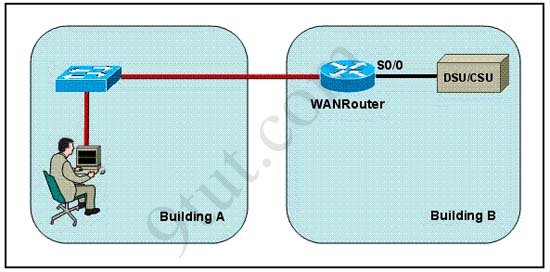
Refer to the exhibit. The network administrator is in a campus building distant from Building B. WANRouter is hosting a newly installed WAN link on interface S0/0. The new link is not functioning and the administrator needs to determine if the correct cable has been attached to the S0/0 interface. How can the administrator accurately verify the correct cable type on S0/0 in the most efficient manner?
remoteconnect1

A. Telnet to WANRouter and execute the command show interfaces S0/0
B. Telnet to WANRouter and execute the command show processes S0/0
C. Telnet to WANRouter and execute the command show running-configuration
D. Telnet to WANRouter and execute the command show controller S0/0
E. Physically examine the cable between WANRouter S0/0 and the DCE.
F. Establish a console session on WANRouter and execute the command show interfaces S0/0


Answer: D

Explanation:

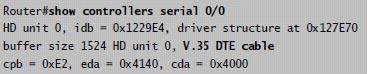
The show controller command displays the information about the physical interface itself and the type of serial cable plugged into a serial port. In this case, it should be a DTE cable that plugs into a type of data service unit (DSU).

For your understanding, below is the output of this command:
show_controllers

From the output, we notice that serial 0/0 has a DTE cable and would get its clocking from the DSU.

Question 2:

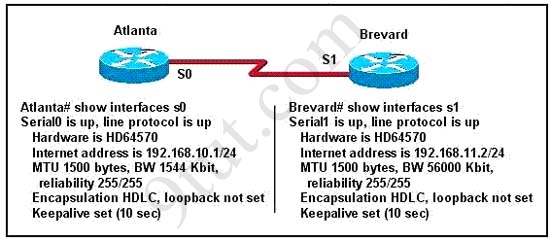
Two routers named Atlanta and Brevard are connected by their serial interfaces as shown in the exhibit, but there is no data connectivity between them. The Atlanta router is known to have a correct configuration. Given the partial configurations shown in the exhibit, what is the problem on the Brevard router that is causing the lack of connectivity?
connecttworouters

A. A loopback is not set
B. The IP address is incorrect.
C. The subnet mask is incorrect.
D. The serial line encapsulations are incompatible.
E. The maximum transmission unit (MTU) size is too large.
F. The bandwidth setting is incompatible with the connected interface.


Answer: B


Question 3:

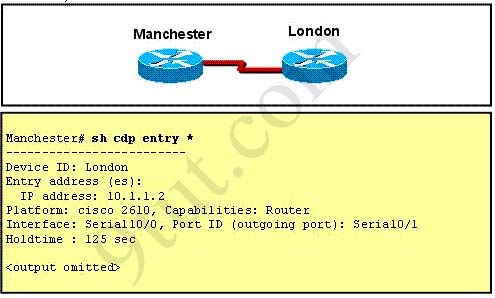
Refer to the exhibit. The two exhibited devices are the only Cisco devices on the network. The serial network between the two devices has a mask of 255.255.255.252. Given the output that is shown, what three statements are true of these devices? (Choose three)
showcdptworouters

A. The Manchester serial address is 10.1.1.1.
B. The Manchester serial address is 10.1.1.2.
C. The London router is a Cisco 2610.
D. The Manchester router is a Cisco 2610.
E. The CDP information was received on port Serial0/0 of the Manchester router.
F. The CDP information was sent by port Serial0/0 of the London router.


Answer: A C E

Explanation:

From the output, we learn that the IP address of the neighbor router is 10.1.1.2 and the question stated that the subnet mask of the network between two router is 255.255.255.252. Therefore there are only 2 available hosts in this network (22 – 2 = 2). So we can deduce the ip address (of the serial interface) of Manchester router is 10.1.1.1 -> A is correct

The flatform of the neighbor router is cisco 2610, as shown in the output -> C is correct

Maybe the most difficult choice of this question is the answer E or F. Please notice that “Interface” refers to the local port on the local router, in this case it is the port of Manchester router, and “Port ID (outgoing port)” refers to the port on the neighbor router -> E is correct.

Question 4:

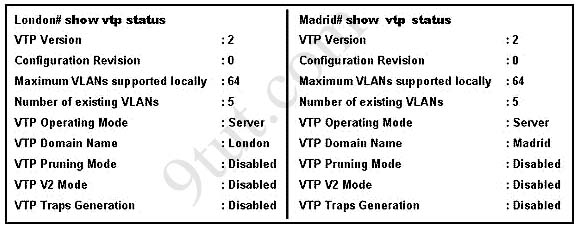
A network administrator has configured two switches, named London and Madrid, to use VTP. However, the switches are not sharing VTP messages. Given the command output shown in the graphic, why are these switches not sharing VTP messages?
showvtp

A. The VTP version is not correctly configured.
B. The VTP operating mode is not correctly configured.
C. The VTP domain name is not correctly configured.
D. VTP pruning mode is disabled.
E. VTP V2 mode is disabled.
F. VTP traps generation is disabled.


Answer: C

Explanation

In the exhibit, the Domain Names of 2 switches are mismatched (one is “London” and the other is “Madrid”) so these switches do not share VTP messages -> The VTP domain name is not correctly configured. Notice that the Domain Names should be the same on both switches to share VTP messages.

Question 5:

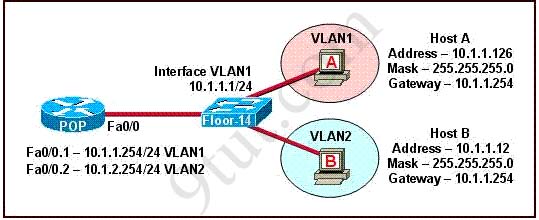
The network shown in the diagram is experiencing connectivity problems. Which of the following will correct the problems? (Choose two.)
vlansetup

A. Configure the gateway on Host A as 10.1.1.1.
B. Configure the gateway on Host B as 10.1.2.254.
C. Configure the IP address of Host A as 10.1.2.2.
D. Configure the IP address of Host B as 10.1.2.2.
E. Configure the masks on both hosts to be 255.255.255.224.
F. Configure the masks on both hosts to be 255.255.255.240.


Answer: B D

Question 6:

Refer to the exhibit:
intervlan1

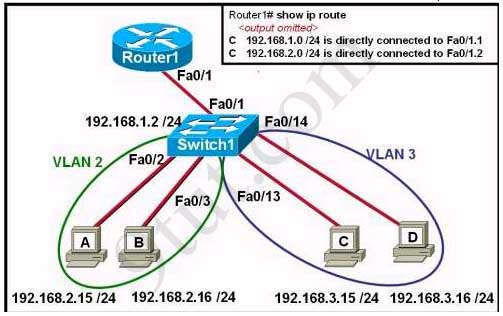
The network administrator has created a new VLAN on Switch1 and added host C and host D. The administrator has properly configured switch interfaces FastEthernet0/13 through FastEthernet0/24 to be members of the new VLAN. However, after the network administrator completed the configuration, host A could communicate with host B, but host A could not communicate with host C or host D. Which commands are required to resolve this problem?

A. Router(config)# interface fastethernet 0/1.3
Router(config-if)# encapsulation dot1q 3
Router(config-if)# ip address 192.168.3.1 255.255.255.0

B. Router(config)# router rip
Router(config-router)# network 192.168.1.0
Router(config-router)# network 192.168.2.0
Router(config-router)# network 192.168.3.0

C. Switch1# vlan database
Switch1(vlan)# vtp v2-mode
Switch1(vlan)# vtp domain cisco
Switch1(vlan)# vtp server

D. Switch1(config)# interface fastethernet 0/1
Switch1(config-if)# switchport mode trunk
Switch1(config-if)# switchport trunk encapsulation isl


Answers: A


Question 7:

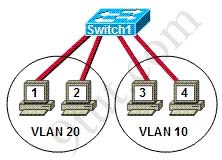
Refer to the exhibit. Hosts on the same VLAN can communicate with each other but are unable to communicate with hosts on different VLANs. What is needed to allow communication between VLANs?
intervlan2

A. a switch with a trunk link that is configured between the switches
B. a router with an IP address on the physical interface that is connected to the switch
C. a switch with an access link that is configured between the switches
D. a router with subinterfaces configured on the physical interface that is connected to the switch


Answer: D


Question 8:

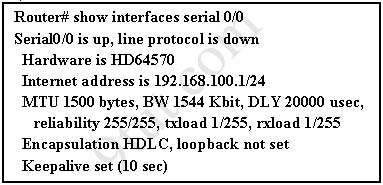
The show interfaces serial 0/0 command resulted in the output shown in the graphic. What are possible causes for this interface status? (Choose three)
showinterfaces

A. The interface is shut down.
B. No keepalive messages are received.
C. The clockrate is not set.
D. No loopback address is set.
E. No cable is attached to the interface.
F. There is a mismatch in the encapsulation type.


Answer: B C F

Question 9:

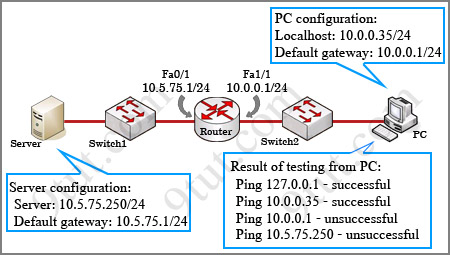
While troubleshooting a connectivity issue from a PC you obtain the following information:
Local PC IP address: 10.0.0.35/24
Default Gateway: 10.0.0.1

Remote Sever: 10.5.75.250/24

You then conduct the following tests from the local PC:
Ping 127.0.0.1 – Successful
Ping 10.0.0.35 – Successful
Ping 10.0.0.1 – Unsuccessful
Ping 10.5.75.250 – Unsuccessful
troubleshootingconnectivity

What is the underlying cause of this problem?

A. A remote physical layer problem exists.
B. The host NIC is not functioning.
C. TCP/IP has not been correctly installed on the host.
D. A local physical layer problem exists.


Answer: D

Comments
Comment pages
1 2 9
  1. sam cobain
    December 3rd, 2010

    Hi, can u explain question 8 for me, i really don’t understand.
    Interface is encapsulated HDLC by default, why choose F?
    and why choose B?
    Thanks!

  2. say500
    December 3rd, 2010

    I am pretty sure they are referring to the other router on the end of the s0/0 interface. The other router’s protocol might be PtP so you will have a protocol mismatch. That is why F.

  3. 9tut
    December 3rd, 2010

    Thank say500 for your answer, you was right. Router at the other end may have a different encapsulation protocol like Point-to-Point so it can mismatch with HDLC protocol

    We chose answer B because from the output “S0/0 is up, line protocol is down” we can deduce that there is a problem at layer 2 (the Data Link layer) where keepalive messages operate at. And a status like that can be a result of no keepalive messages coming from the remote router

  4. Adnan
    December 3rd, 2010

    Explanation of Q 8 for those who doesn’t know

    B)
    Because True encapsulation occurred in layer 2 which is layer 2 and we know that every interface have 2 status ( one is physical which means cable connectivity and second is data link layer which means encapsulation like hdlc, ppp, frame relay, etc etc.

    C)
    If clock rate is not set then no bandwidth will available for communication so that’s why C is correct.

    D)
    Check the explanation of B)

  5. tuna
    December 3rd, 2010

    wrong encapsulation is make “line protocol is down” :)

  6. naveen
    December 3rd, 2010

    bcoz in q.8 the answer a is incorrect it can be if interface line protocol is administratively shut down state

  7. ryan
    December 3rd, 2010

    The output says Serial 0/0 is up,line protocol is down .So,we know that the first aspect that is Serial 0/0 is refering to the Physical layer,which infact is up so there seems to be no problem with the Physical layer or the cabling ,So we eliminate the the options A) and E)

    Second aspect suggests that the line protocol is down ,which means that there is a problem with the Data link layer Most possible problems with the datalink layer are 1) Wrong encapsulation 2) wrong clock rate so we select C) & F) & now we are left with B) and D) Keepalive timer is essential for each end to know if the other end disappears, If there is no activity on the connection for 10secs , the end device sends a probe segment to the router so my assumption is that no Keepalive messages were received before the timer expired.

    my answer is B C F

  8. Blaze
    December 3rd, 2010

    please give me a correct answer for this

    what is the advantage of using point to point sub interface instead of a multipoint interface in router ?

  9. 9tut
    December 3rd, 2010

    By using point to point sub interface you can avoid split horizon on Frame Relay circuits

  10. Blaze
    December 3rd, 2010

    While troubleshooting a connectivity issue from a PC you obtain the following
    information:

    Local PC IP address: 190.0.3.35/24
    Default Gateway: 190.0.3.1
    Remote Server: 190.0.5.250/24

    You then conduct the following tests from the local PC:
    Ping 127.0.0.1 – Unsuccessful
    Ping 190.0.3.35 – Successful
    Ping 190.0.3.1 – Unsuccessful
    Ping 190.0.5.250 – Unsuccessful

    What is the underlying cause of this problem?
    A. TCP/IP not correctly installed
    B. Local physical layer problem
    C. NIC not functioning
    D. Remote physical layer problem
    E. None of the above

    Answer: A

    Explanation:

    Every Windows based PC uses the 127.0.0.1 as the local loopback IP address. Every PC
    will respond to this local IP address if the TCP/IP stack is correctly installed and running
    on the machine. If you cannot ping the loopback address of 127.0.0.1, then something is
    wrong with the TCP/IP protocol stack.

    is this answer correct?

    is this a local physical layer problem?

    9tut plz answer very urgent

  11. 9tut
    December 3rd, 2010

    Blaze, you mistyped the question because if you can not ping 127.0.0.1 (Ping 127.0.0.1 – Unsuccessful) then you can not ping 190.0.3.35 successfully (but you wrote Ping 190.0.3.35 – Successful)

    If you can ping 190.0.3.35 then its TCP/IP protocol was installed correctly, so the answer can not be A

  12. Blaze
    December 3rd, 2010

    then the answer is “Local physical layer problem” right?

  13. 9tut
    December 3rd, 2010

    Yes!

  14. Shin
    December 3rd, 2010

    I really want to know the reason why “D” is selected as the correct answer. in the Q1.
    The answer is simply “A”, isn’ t it ?
    why is “the controller S0/0″ here?

  15. 9tut
    December 3rd, 2010

    @Shin: I updated the page with the explanation you need. In short, the “show interfaces s0/0″ command doesn’t give us information about the cable type

  16. Vaidas
    December 3rd, 2010

    Why there’s local physical problem on the question 9?
    What if link between Router and Switch1 is failed? Thanks!

    Does the ‘local’ in this case refer to what’s behind the router meaning broadcast domain where the host is located? Thanks

  17. 9tut
    December 3rd, 2010

    @Vaidas: Yes, the “local” here means “on the same network” or “in a same broadcast domain”

  18. goro
    December 3rd, 2010

    question 9

    how can the answer B correct?

    it can ping both 127.0.0.1 and its ip address, it means NIC is functioning and cable is connected to PC and it’s getting the IP address so there absolutely no local physical layer problems……the problem is with a remote physical layer.

  19. 9tut
    December 3rd, 2010

    The “local physical layer” here is the interface fa1/1 of the router, not the PC itself. The word “local” here means “in the same broadcast domain”

  20. goro
    December 3rd, 2010

    well I would say that the question itself is incorrect. I myself understood this question as a local host vs remote host. This is what unclear in this question. “local physical layer” for me is local PC physical layer……and “remote physical layer” – remote switches and routers. That’s why I was shocked when I saw the answer.

    Be careful answering this question.

  21. study-T
    December 3rd, 2010

    Hi 9UT,

    I can see the confusion with question 9, maybe if it was laid out in ref to the router rather than the PC, then we may of got your drift.

    Anyway THANK YOU VERY MUCH for putting together an awesome site..

  22. ccna’er
    December 3rd, 2010

    Please can somebody explain question 2 as i thought it was

    F. The bandwidth setting is incompatible with the connected interface.

    As the Bw are different on each router ?

  23. 9tut
    December 3rd, 2010

    Two connected interfaces don’t belong to one network, so it is the problem. The BW will not cause the lack of connectivity

  24. CiscomBo
    December 3rd, 2010

    Q#6 Host B hast incorrect ip address, Must be 192.168.2.16 instead of ~2.15/24 because it’s HOST A’s ip address…but we have understood

  25. Stevec90
    December 3rd, 2010

    TUT9 — Thanks for posting that about question 9 being very misleading. I too reasoned that, 1)if you can ping the loopback on the PC, then no physical problem (TCP/IP can be wrong and the loopback will still respond unless the NIC is bad). 2)If the PC can ping it’s own IP, then the protocol stack is working and configured correctly. Therefore, this points to a “remote” problem. BUT HERE’s the catch, “local” means on the subnet and includes the router interface (which does not respond to a ping). Cisco incorrectly uses the term “local” here, and most experienced IT pros like me, would consider “local” to mean the PC (that is the correct term whether you are MCSE like me, or network geek) and that makes the question is poorly worded. THE PINGs point to a problem with the gateway, not the PC, but the gateway is “local” so the answer listed is correct for number 9. WATCH OUT FOR that one!

  26. pat
    December 3rd, 2010

    Hi,
    Regarding question 3, I tried with packet tracer…

    Manchester#sh ip int br
    Interface IP-Address OK? Method Status Protocol
    Serial0/0/0 10.1.1.1 YES manual up up

    Manchester#sh cdp entry *
    Device ID: London
    Entry address(es):
    IP address : 10.1.1.2
    Platform: cisco C1841, Capabilities: Router
    Interface: Serial0/0/0, Port ID (outgoing port): Serial0/0/1
    Holdtime: 124

    So answer E is correct.

  27. chia long
    December 3rd, 2010

    re:
    Hi, can u explain question 8 for me, i really don’t understand.
    Interface is encapsulated HDLC by default, why choose F?
    and why choose B?
    Thanks!

    i think it is because, your line protocol is down so maybe cuz of a worng encapsulation . (other side has different encapsulation)

  28. jaragaro
    December 3rd, 2010

    Hi!

    If you noticed in the output, it said serial UP and line protocol DOWN.

    This part means: serial > Layer 1 , line protocol > configuration on the router

    With this information you will discard option A: The interface is shut down, because the interface is layer 1 and it is UP. Also, option E: No cable is attached to the interface, it is Layer 1.

    Option D: No loopback address is set, could not be related.

    Now we have the following 3 options for the question What are possible causes for this interface status?:

    B. No keepalive messages are received > because the link is down.

    C. The clockrate is not set > If clockrate is not configured it could produce the link to be down

    F. There is a mismatch in the encapsulation type > both end points must have the same encapsulation type, so they will be able to understand each other.

    About your question, you are correct by default the encapsulation type is HDLC, the other types are frame relay and ppp.

  29. kishore
    December 3rd, 2010

    hi 9tut,
    may i please know the explanation for the q.no4.
    (Is it possible to have two server in the same a network as you configured.)

  30. 9tut
    December 3rd, 2010

    They are two switches that have assigned domain incorrectly (one is London and another is Madrid) so they can not communicate with each other.

  31. caloy
    December 3rd, 2010

    Which is the correct answer on Question 9? Is C or D?

    p4s 7.73 correct answer is C.

    please reply for those who taken the exam..

    Thanks

  32. Omar
    December 3rd, 2010

    The answer to Q9 is correct (D) that’s because a ping to the local network (address 10.0.0.1) was unsuccessful.
    A ping to the loopback address 127.0.0.1 was successful meaning that TCP/IP stack was correctly configured. and hence answer “C” is incorrect.

  33. BD
    December 3rd, 2010

    One of the questions I had when I took my exam, I was not able to find anywhere.

    A router receives a packet with a destination address of 10.0.5.65. Which interface will the router forward the packet to:

    4 interfaces – Directly connected
    10.0.5.0 /24 – Fa0/0 via ********
    10.0.5.64 /27 – Fa0/1 via ********
    10.0.5.64 /28 – S0/0 via ********
    10.0.5.64 /29 – s0/1 via ********

    a. Fa0/0
    b. Fa0/1
    c. s0/0
    d. s0/1

    I had absolutely no idea………….

  34. Sonia
    December 3rd, 2010

    Hi BD

    The correct answer is s0/1 because the subnets mask is 29. You must to think in binary. With 29 you have 5 bit of coincidence for number (65) for that reason the match is more hight than others ….

    Look

    0 1 0 0 0 /29 here you have 5 bits of coincidence
    0 1 0 0 /28 here you have only 4 bits of coincidence
    0 1 0 /27 here you have only 3 bits of coincidence

    Did you understand?

  35. bhagwan
    December 3rd, 2010

    i couldnt understand the answer for question 6,anybody plz makes me understand?ur help will be great for me.

  36. Anonymous
    December 3rd, 2010

    @bhagwan
    For question #6, as shown in the results of using “show ip route command”, you can see that the connection to the 192.168.3.0 network is missing. 192.168.3.0/24 includes Host C and D in VLAN 3.

    Basically, a sub-interface for 192.168.3.0/24 is needed in order to have Inter-VLAN communication. Thus, VLAN 2 and VLAN 3 will be able to communicate.

  37. tommer
    December 3rd, 2010

    Question 4.

    The answer is the domain names don’t match. This makes sense. But, isn’t the fact they’re both in “Server” mode also mean that they wont exchange info?

  38. Ramakrishna Rao Ramaraju
    December 3rd, 2010

    Dear 9tut, I have a simple question which looks critical to me.

    When Hub cannot read data or understand IP address, if I connect 4 PCs to my hub where PC A and B with 10.1.1.1 and 10.1.1.2 as their IPs; and PC C & PC D with 11.1.1.1 and 11.1.1.2 as their IPs, when I send a packet from 10.1.1.1 PC A to 11.1.1.1 PC C, why is it not sending? Hub should broadcast right? Can you please clear this doubt at the earliest of your convenience? I believe you are going great in helping CCNA aspirants and even higher level folks.

  39. BAM
    December 3rd, 2010

    @ Ramakrishna,
    PC’s A & C are on different networks so PC A will send packet to its Default Gateway address not address of PC C. If no Default Gateway device attached to hub all devices will ignore the packet because it doesn’t match their own address.

    Hope this helps.

  40. BAM
    December 3rd, 2010

    @Ramakrishna,
    Regarding last post.
    Sorry, I meant Layer 2 address not layer 3( frames not packets ), so PC A broadcasts arp for default gateway. no default gateway = no arp match. ( need layer 3 device to ROUTE between LAN’s )

    Hope this is clearer.

  41. Jack Jack
    December 3rd, 2010

    Hi,

    Workstation A has been assigned an IP address of 192.0.2.24/28. Workstation B has been assigned an IP address of 192.0.2.100/28. The two Workstations are connected with a straight-through cable. Attempts to pin between the hosts are unsuccessful. What two things can be done to allow communications between the hosts?

    a) Replace the straight-through cable with a crossover cable
    b) change the subnet mask of the hosts to /25
    c) Change the subnet mask of the hosts to /26
    d) change the address of Workstation A to 192.0.2.15
    e) change the address of Workstation B to 192.0.2.111

    ans:- a and b

    can any1 explain how come by change the subnet mask from /28 to /25 will solve the problem?

    regards,

  42. Vijay0n26
    December 3rd, 2010

    Hi Jack,

    Explanation for answer.

    For connecting similar devices we need a cross-over cable.

    In this question both the devices are PC’s so we require a Cross-Over cable.

    This is how Ans A is right.

    If you see the IP address , subnet mask is 255.255.255.240 right so the PC A lies in second subnet which is 192.0.2.16 means 16-32 where 16 is the network .

    For PC B it’s IP address is 192.0.2.100/28 so this comes under 192.0.2.96 network.
    For hosts to communicate with each other needs a Layer 2 or 3 device or should be in same subnet while connecting directly.

    If you put both the PC’s in /25 Subnet Mask, ip address range is 0 to 127 , thus 192.0.2.24 and 192.0.2.100 comes in same subnet

    This is how Ans B is right.

    Hope would have been useful.

    If you find any mistakes , please rectify it.

    regards,

  43. Stevan
    December 3rd, 2010

    Hi all !

    Can anyone explain is answer right?
    Examine the following diagram carefully , the switch was not selected as root bridge vlan 1, why?

    show spanning-tree vlan 1

    vlan0001
    spanning tree enabled protocol rstp
    root id prio 20481
    address 0008.217a.5800
    cost 38
    port 1 (fa0/1)
    hello time 2 sec max age 2 sec forward delay 15 sec

    Bridge Id priority 32769( priority 32768 sys- id -ext 1
    address 0008.205e.6600
    hello time 2 sec max age 2 sec forward delay 15 sec
    aging time 300

    interface Role stats cost prio.nbr type
    fa0/1 root fwd 19 128.1 p2p
    fa0/4 desg fwd 38 128.1 p2p
    fa0/11 altn Blk 57 128.1 p2p
    fa0/13 desg fwd 38 128.1 p2p

    A.Its Mac address is higher than the elected root bridge

    B.It has multiple interfaces connected to root network segment

    C. It is implementing RSTP while the elected root bridge is running 802.1d spanning tree

    D. It has higher bridge Id Than the elected rootbridge

    Answer is D

    My explanation:

    BID = bridge priority + Mac address

    swith 1:
    top 1 : currentone
    BID = 20481 + 0008.217a.5800

    switch 2:
    secondly displayed alredy existed switch
    BID = 32769 +0008.205e.6600

    Switch 2′s BID > switch’s 1 BID

    By this, I thing switch 2 is the root bridge.

    Do we need to thing, other factors? i.e cost, etc..

    Please clear.
    thank you in advance.

  44. Stevan
    December 3rd, 2010

    Hi all!

    My concept was wrong before. that is my mistake, sorry.

    By that switch 2 should not be anymore rootbridge, newer one- top 1- should be root bridge. because of lower bridge ID.
    by that can we conclude, if priority is not same then lesser priority automatically becomes the root bridge, regardless of MAC addresses ?
    ‘switch was not selected as root bridge’ – which is confused me.. maybe they may add ‘ anymore’ at the end. By that I know examiner talk about already existing one.
    Thank you

  45. 9tut
    December 3rd, 2010

    Notice: The day of the above posts are not correct because of the upgrade

  46. hasy
    December 12th, 2010

    i got my exam yesterday and passed with 974. especial thanks for the 9tut. pass4sure & testinside dumps are still valid. sims are eigrp,vtp & access-list only the ip addresses are changed. in access-list the the pc also changed. again thanks for the 9tut and all of the contributors

    if any one need help from me pls email to

    hasy_001@yahoo.com

  47. lakshman
    December 18th, 2010

    can any one give the explanation for question 6 why the answer is option “A”

  48. AT
    December 20th, 2010

    hi can u plz explain y its option d in ques 5….

  49. ptrck
    December 20th, 2010

    @lakshman
    In order for inter VLAN communication to take place, the router must be configured with subinterfaces each with its own unique subnet per VLAN.
    If we base this information on the answer’s provided option A has the correct commands to configure the router with a 3rd (fa0/1.3) subinterface with IP 192.168.3.1.
    After this subinterface has been configured with the correct encapsulation type, Hosts A&B on VLAN 2 will be able to communicate with hosts C&D on VLAN 3.

    Hope that helps :)

  50. ptrck
    December 20th, 2010

    @AT
    The IP for Host B is 10.1.1.12. If you look at the information provided for the subinterfaces on Router POP, VLAN 2 is on subnet 10.1.2.254. Host B is suppose to be on VLAN 2 but is configured with an incorrect IP address. If host B were to be configured with 10.1.2.2 (option D) this would correct the issue because now host B is on the same subnet as its gateway.

  51. lakshman
    December 22nd, 2010

    @ ptrck

    then can we use the trunk port ?

  52. ptrck
    December 23rd, 2010

    Yes, I would think that the next option would be to verify if the int fa0/0 on the switch is configured as a trunk. Kind of a tricky question because in theory you need to have the fa0/0 on the switch configured as a trunk.
    But if we get back to the question, routing with sub-interfaces is required first for vlans to talk to each other.

  53. lakshman
    December 24th, 2010

    thank you

  54. chandru-4444
    December 26th, 2010

    any1 tell me is this tut9 questions still valid???????????

    pl help me out

  55. Sandy
    January 3rd, 2011

    Yap……..
    all the qustion of 9tut still valid…………
    Any one if any problem mail me : sandip.eklaghor@gmail.com

  56. Deepak Nath
    January 8th, 2011

    Question 3:
    In Pass4sure v17.14 the answer to the q3 is A C F
    But in vcem the answer to the question is A C E
    Here it’s A C E

    So i’m going for A C E

  57. Bilal Khalid
    January 12th, 2011

    some one send me latest Dumps For CCNA exam on my Email Id: Lucky_4_ever_91@yahoo.com
    plzzzzzzzzzzzzzzzzzzzzzzzzzzzz
    im thanks ful

  58. bebro
    January 25th, 2011

    please anybody send me latest Dumps for CCNA, my mail bebro4@yahoo.com

  59. Odoyl
    January 26th, 2011

    Please send me the latest dumps for the CCNA. The more labs you have the BETTER!
    odoyle22@hotmail.com

  60. Roman
    February 3rd, 2011

    Explanation for question 9:

    Ping to 127.0.0.1 or loopback. If you can ping this address then TCP/IP is working properly on your device. If you cannot ping this, then there is a problem with your TCP/IP protocols.

    Ping to your own IP address. If you can ping this IP address then there is no problem between you and the switch. You are sending the ICMP frame to the switch and the switch is sending it back to you. If you cannot ping your own IP, then there is a problem between you and the switch (switch, cabling, or NIC)

    Ping to your default gateway. If you can ping this IP address then there is no problem between you and the default gateway. If you cannot ping this address then there is a problem somewhere between you and the default gateway.

    In this example, we were able to ping our loopback (TCP/IP working), we were able to ping our own interface (switch, cabling to switch, NIC are all good), but we were not able to ping the router (problem between router and switch). Because this lies on the same network, it is considered to be “LOCAL” (hence LAN = local area network).

    A. A remote physical layer problem exists.- NO, the problem is not on the remote side of the Router, it is a LOCAL AREA NETWORK connectivity problem
    B. The host NIC is not functioning. – NO, we can ping our own IP address, that means that the NIC, cabling to switch and switch are good.
    C. TCP/IP has not been correctly installed on the host. NO, we can ping our loopback, TCP/IP is good.
    D. A local physical layer problem exists. YES – there is a connectivity problem between the switch and router

  61. Roman
    February 3rd, 2011

    Explanation for question 8:

    Serial0/0 is … – This tells us the physical state of the interface. Up means there is a working physical connection to a neighboring device. Down means there is a physical connection problem to the neighboring device. Administratively down means that the interface is manually shutdown.

    Serial0/0… line protocol is – Line Protocol is Layer 2 and is monitored with keepalives. Up means that the interface is receiving keepalives from the other DCE/DTE device. Down means that the device is configured to receive keepalives, but is not receiving keepalives (problem can be: encapsulation mismatch, clockrate mismatch)

    NOTE: if you disable keepalives with (config-if)#no keepalive then line protocol will ALWAYS be up, whether encapsulation/speed is correct or not.

    In this example we see that Serial0/0 is up physically but the line protocol is down AND that keepalives have been set to 10seconds. This router is expecting keepalives on layer 2 but is not receiving them. The problem has to do with encapsulation or speed mismatch.

    A. The interface is shut down. NO – this would show ‘Serial0/0 is administratively down’
    B. No keepalive messages are received. YES – The router is configured for keepalives, however because it is not receiving them, line protocol is set to down.
    C. The clockrate is not set. YES – possible that the clock rate is not configured correctly on the DCE (clocker). If the DCE clocking is not configured, there is no bandwidth on the line and the keepalives will not be transmitted or received.
    D. No loopback address is set. NO – loopbacks have nothing to do with connectivity
    E. No cable is attached to the interface. NO – if the cable was not connected we would show ‘Serial0/0 is down’. this would be a layer 1 problem
    F. There is a mismatch in the encapsulation type. YES – if there is a mismatch of the encapsulation types, when one side encapsulates the frame and sends it, the other side will not know what it received. You send x, it is expecting y, drops the packet. This can cause keepalives to not be received.

  62. sayeed
    February 26th, 2011

    thanks thanks and thanks a lot 4 giving me a useful resource …………wish u all the best dear

  63. sayeed
    February 26th, 2011

    some one send me latest Dumps For CCNA exam on my Email Id: sayeedshah69@yahoo.com plz plz plz……………
    im thanks ful

  64. sayan
    March 10th, 2011

    can any1 explain q5…

  65. miki
    March 11th, 2011

    Which command reveals the last method used to powercycle a router?
    1. Show relaod 2. Show boot 3.Show running-config 4.Show version
    answer is show version . Can anyone explain what is powercycle and its relation with show version
    Thanks
    Miki

  66. Arwin_att
    March 12th, 2011

    Comment on Q5, why do we need to configure the subnet mask for both networks as 255.255.255.248, when they are on 2 separate network VLAN 1 is at 10.1.1.0/24 and VLAN 2 is at 10.1.2.0/24 whats wrong with a full Class C ?

  67. Blackbird
    March 14th, 2011

    Question 9
    Answer is D (a local physical layer problem) because the ping result is unsuccessful

    But:

    if the result was (Unreachable destination) then the Answer would be A (a remote physical layer problem).

  68. miftaul
    March 15th, 2011

    can anyone help me to find the correct answer to this question.

    A network technician analyzes the network and notices late collisions. The collisions occur accompanied by jabber that originates from the server. What is the likely cause of the problem?
    1. faulty switch port
    2. web server CPU overload
    3. faulty NIC in the web server
    4. misconfiguration of web server services

  69. Alinio
    April 4th, 2011

    can anyone help me to find the correct answer to this question.

    “A network technician analyzes the network and notices late collisions. The collisions occur accompanied by jabber that originates from the server. What is the likely cause of the problem?
    1. faulty switch port
    2. web server CPU overload
    3. faulty NIC in the web server
    4. misconfiguration of web server services”

    the answer is 2. web server CPU overload

  70. Alinio
    April 4th, 2011

    Sorry, the answer is “3. faulty NIC in the web server.” Faulty network interface cards (NICs) can be the cause of network transmission errors due to late collisions, short frames, and jabber. Jabber is often defined as the condition in which a network device continually transmits random, meaningless data onto the network. Other likely causes of jabber are faulty or corrupt NIC driver files, bad cabling, or grounding problems.

  71. MadCow
    April 10th, 2011

    Question 2, the subnet mask can also be incorrect. change subnet to /23 and both hosts would be on the same network.

    Address: 192.168.10.1 11000000.10101000.0000101 0.00000001
    Netmask: 255.255.254.0 = 23 11111111.11111111.1111111 0.00000000
    Wildcard: 0.0.1.255 00000000.00000000.0000000 1.11111111
    Network: 192.168.10.0/23 11000000.10101000.0000101 0.00000000
    HostMin: 192.168.10.1 11000000.10101000.0000101 0.00000001
    HostMax: 192.168.11.254 11000000.10101000.0000101 1.11111110
    Broadcast: 192.168.11.255 11000000.10101000.0000101 1.11111111
    Hosts/Net: 510 Class C, Private Internet

  72. MadCow
    April 10th, 2011

    sorry ignore the above comment… Question states: “The Atlanta router is known to have a correct configuration.”

  73. Nisam
    April 21st, 2011

    Some one please send latest CCNA Dumps to my mail id: nisam360@gmail.com.
    Thanks in advanse.

  74. taps
    April 30th, 2011

    hie 9tut i kindly request ccna dumps to my email tapszik@gmail.com have an exam on friday
    thanks in advance

  75. FER
    May 5th, 2011

    If anyone has the latest dumps please send to frankereyes@hotmail.com. Thanks

  76. hassan
    May 23rd, 2011

    hi Every body ,my Exam after 2 days ,i study well but am afraid too can any body send me the last dumps ,i will be thankfull
    hassan_salamah@hotmail.com

  77. Masa
    May 25th, 2011

    Please send me latest CCNA Dumps, my email : hoang.ha.duong@gmail.com

  78. manju
    June 2nd, 2011

    pleasesend me latest ccna dumps,my mail :roshithamanju@yahoo.com

  79. Chickie
    June 3rd, 2011

    Passed the CCNA exam today – Philippines 920/1000 – thank you so much 9tut, acme, mashti, and examcollections, and to my trainer..

    Simulations are the same – VTP, ACL and EIGRP.

    A lot of questions were not from the dumps.. our of the 356 dumps, only 5 – 10 questions were included. The most important is that you know the concept. 9tut Rocks…

    goodluck to all CCNA aspirants :) time to sleep after 3 months of lack of sleep lol

  80. hassan
    June 7th, 2011

    hi my friends i passed my exam today with a score 900 iam really happy :) ,i wish the best for everyone ,thanx 9tut ,all simulation came frome this site excipt ACL they add a new commands but you can deal with it simply ,alot of drag & drop came frome here too ,but you should solve any dumps you have especially last one ,good luck for all

  81. rohini
    June 8th, 2011

    @ hassan , can u plz send me latest dumps @ rohinisharma94@gmail.com .
    i have exam next week .. What type of qus did u get in ur exam ?

    Thanks

  82. @avi
    June 8th, 2011

    please send me the latest dumps of CCNA
    thanx in advance
    arvind_verma26@rediffmail.com

  83. titi
    June 15th, 2011

    can anybody send me the latest CCNA dumps.. i’m doing my exam in next week…
    thanks..!!!
    tithirawickmal@ymail.com

  84. Anonymous
    June 15th, 2011

    Can anyone please send me the latest CCNA dumps. Thank you in advance.

    biniadam@hotmail.co.uk

  85. Anonymous
    June 16th, 2011

    please anybody send me lattest dump ……….my ccna exam is i next week…….thanx……..
    gkshirsagar88@gmail.com

  86. syed nizam
    June 16th, 2011

    May god help us to share our knowledge and contribution towards benefit of mankind!!!!!!!!!!!.This shows we have already initiated and hope it will pickup very swiftly….

    Regards,
    Syed Nizam

  87. Kayden
    July 3rd, 2011

    Im gonna take the CCNA exam on 9 July 11. Can any kind soul send the latest dump to my email add: aken31@hotmail.com. thanks alot. Greatly appreciated!

  88. vinicius
    July 7th, 2011

    Thank you so much!

  89. Floccinaucinihilipilification
    July 8th, 2011

    In question no. 3 why the answer is E, not F? pls. explain me.

  90. CCNA Dumps
    July 20th, 2011

    team,

    please send me the latest CCNA Dumps to Srinivas_Munagal@yahoo.com.. Thanks

  91. Anonymous
    July 31st, 2011

    can u pls send me latest ccna dumps.i have gonna take ccna exam on aug 3…
    mail id:navaneethana.m@gmail.com
    lots of thanks
    in advance

  92. samir
    August 10th, 2011

    Can anyone please send me the latest CCNA dumps

    samirhalim24@yahoo.fr

  93. Piva
    August 10th, 2011

    Pessoal bom dia,
    Por favor, gostaria de receber algumas dicas para prova CCNA, pois vou fazer a mesma ainda este mês.
    Agradecimentos piva@interfacetec.com.br

  94. amogh
    August 18th, 2011

    please send me the latest CCNA dumps
    amogh.coolperson@gmail.com

  95. anonymous
    September 2nd, 2011

    @Floccinaucinihilipilification
    See in this Q3 there is great confusion..but wat doez d question says is “Given the output that is shown, what three statements are true of these devices?”
    Please notice that “Interface” refers to the local port on the local router, in this case it is the port of Manchester router, and “Port ID (outgoing port)” refers to the port on the neighbor router -> E is correct.
    and the port serial 0/0 is not the port of the london router to which to which the manchester router is connected…

  96. 123
    September 6th, 2011

    anonymous
    how was your exam? and you had what kind of sim questions?

  97. ken
    September 8th, 2011

    Hi, Appreciate if someone could send me the latest dumps at treepanel.ken@hotmail.com , i plan to take the exams at the end of sep.
    Thanks.

  98. Fe
    September 10th, 2011

    Hi all! can someone send me the latest CCNA actual exam?

    please send it to bny521@yahoo.com

    Appreciate anyone who will share it. Thanks!

  99. patso
    September 14th, 2011

    can someone explain qn 6?

  100. DimS
    September 16th, 2011

    @pasto: In Q6 – answer is A:
    Admin add new VLAN, configured switch interfaces and assign port to new VLAN. New VLAN = separate broadcast domain = separate subnet. If you need to send packets in another subnet – you need to route them. So we need to make some configurations on the router, i.e. add new subinterface on FA 0/1
    Router(config)#int f0/1.3
    Assign IP address (it will be gateway hosts in the VLAN3)
    Router(config-if)#ip add 192.168.3.1 255.255.255.0
    Specify the encapsulation (in this case may be only 802.1.q) and VLAN
    Router(config-if)#encapsulation dot1.q 3

    Answer B: Router automatically will routing packets for directly connected networks. We haven’t to configure routing protocol. So answer is wrong.

    Answer C: Describes configuring of VTP. We dont’t need it in this case. So it’s wrong.

    Answer D: Describes configuring trunk link but for the trunk link between router and switch we have to use encapsulation 802.1q (i.e. switchport trunk enc dot1q). So it’s wrong too.

    That’s all…

Comment pages
1 2 9
  1. No trackbacks yet.
Add a Comment