
Wireless Tutorial
In this article we will discuss about Wireless technologies mentioned in CCNA.
Wireless LAN (WLAN) is very popular nowadays. Maybe you have ever used some wireless applications on your laptop or cellphone. Wireless LANs enable users to communicate without the need of cable. Below is an example of a simple WLAN:
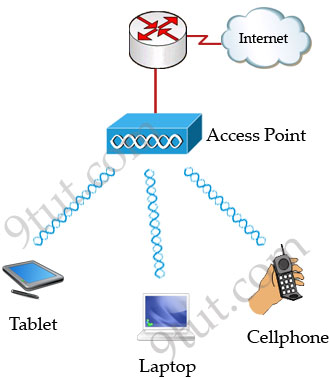
Each WLAN network needs a wireless Access Point (AP) to transmit and receive data from users. Unlike a wired network which operates at full-duplex (send and receive at the same time), a wireless network operates at half-duplex so sometimes an AP is referred as a Wireless Hub.
The major difference between wired LAN and WLAN is WLAN transmits data by radiating energy waves, called radio waves, instead of transmitting electrical signals over a cable.
Also, WLAN uses CSMA/CA (Carrier Sense Multiple Access with Collision Avoidance) instead of CSMA/CD for media access. WLAN can’t use CSMA/CD as a sending device can’t transmit and receive data at the same time. CSMA/CA operates as follows:
+ Listen to ensure the media is free. If it is free, set a random time before sending data
+ When the random time has passed, listen again. If the media is free, send the data. If not, set another random time again
+ Wait for an acknowledgment that data has been sent successfully
+ If no acknowledgment is received, resend the data
IEEE 802.11 standards:
Nowadays there are three organizations influencing WLAN standards. They are:
+ ITU-R: is responsible for allocation of the RF bands
+ IEEE: specifies how RF is modulated to transfer data
+ Wi-Fi Alliance: improves the interoperability of wireless products among vendors
But the most popular type of wireless LAN today is based on the IEEE 802.11 standard, which is known informally as Wi-Fi.
* 802.11a: operates in the 5.7 GHz ISM band. Maximum transmission speed is 54Mbps and approximate wireless range is 25-75 feet indoors.
* 802.11b: operates in the 2.4 GHz ISM band. Maximum transmission speed is 11Mbps and approximate wireless range is 100-200 feet indoors.
* 802/11g: operates in the 2.4 GHz ISM band. Maximum transmission speed is 54Mbps and approximate wireless range is 100-200 feet indoors.
ISM Band: The ISM (Industrial, Scientific and Medical) band, which is controlled by the FCC in the US, generally requires licensing for various spectrum use. To accommodate wireless LAN’s, the FCC has set aside bandwidth for unlicensed use including the 2.4Ghz spectrum where many WLAN products operate.
Wi-Fi: stands for Wireless Fidelity and is used to define any of the IEEE 802.11 wireless standards. The term Wi-Fi was created by the Wireless Ethernet Compatibility Alliance (WECA). Products certified as Wi-Fi compliant are interoperable with each other even if they are made by different manufacturers.
Access points can support several or all of the three most popular IEEE WLAN standards including 802.11a, 802.11b and 802.11g.
WLAN Modes:
WLAN has two basic modes of operation:
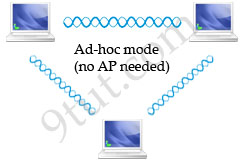
* Ad-hoc mode: In this mode devices send data directly to each other without an AP.
* Infrastructure mode: Connect to a wired LAN, supports two modes (service sets):
+ Basic Service Set (BSS): uses only a single AP to create a WLAN
+ Extended Service Set (ESS): uses more than one AP to create a WLAN, allows roaming in a larger area than a single AP. Usually there is an overlapped area between two APs to support roaming. The overlapped area should be more than 10% (from 10% to 15%) to allow users moving between two APs without losing their connections (called roaming). The two adjacent APs should use non-overlapping channels to avoid interference. The most popular non-overlapping channels are channels 1, 6 and 11 (will be explained later).
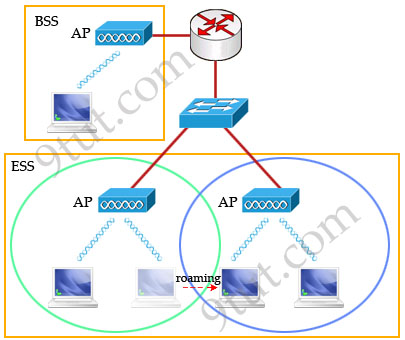
Roaming: The ability to use a wireless device and be able to move from one access point’s range to another without losing the connection.
When configuring ESS, each of the APs should be configured with the same Service Set Identifier (SSID) to support roaming function. SSID is the unique name shared among all devices on the same wireless network. In public places, SSID is set on the AP and broadcasts to all the wireless devices in range. SSIDs are case sensitive text strings and have a maximum length of 32 characters. SSID is also the minimum requirement for a WLAN to operate. In most Linksys APs (a product of Cisco), the default SSID is “linksys”.
In the next part we will discuss about Wireless Encoding, popular Wireless Security Standard and some sources of wireless interference.


Hello… please share with me too avencas @ gmail
Thanks a lot
Thanks a lot, pls share a complete handbook which help to understand complete CCNA in wireless.
HI… i just started learning ccna a couple of months ago, and am trying and pushing myself to go to the exam on March, your help would be much appreciated if you can send me any tips or tricks how to pass the exam and you can email me @ awes1717 gmail .com
Hi, can you please update this information, at least the standards.
Thanks a lot.
Regards,
luis
hi… im new to ccna i just started learning, if you would please help me with any tips or dumps, i would be so grateful. my email is {email not allowed}
@ muizsalamy gmail.com
Are questions about wireless lan controllers on the CCNA wireless exam at all?
Isn’t some of this information outdated?
Would be nice to Update this site:
New standards like 802.11n
MIMO
HI… i just started learning ccna a couple of months ago, and am trying and pushing myself to go to the exam on May, your help would be much appreciated if you can send me any tips or tricks how to pass the exam and you can email me @ yamiyuhiko@gmail.com